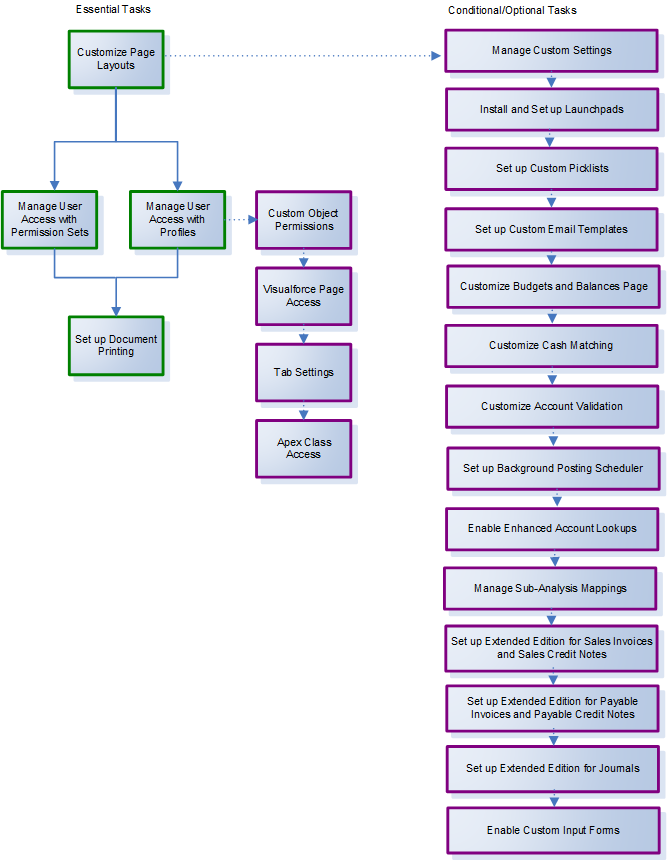
Click on the following chart to display a corresponding setup topic, then carry out the setup tasks described there. You should be signed in as the System Administrator, or equivalent, to complete these tasks. Click System Administrator Setup in the Contents pane to return to this page.
This section outlines the steps relevant to a first installation.
Related Tasks
Customizing Page Layouts (and Search Layouts)
Managing User Access with Permission Sets
Managing User Access with Profiles
Custom Object Permissions Checklist
Setting up Custom Picklist Values
Setting up Custom Email Templates
Customizing the Budgets and Balances Page
Setting up the Background Posting Scheduler
Setting up Enhanced Account Lookup and Auto-complete
Managing Sub-Analysis Mappings
Setting up Extended Edition for Sales Invoices and Sales Credit Notes
Setting up Extended Edition for Payable Invoices and Payable Credit Notes