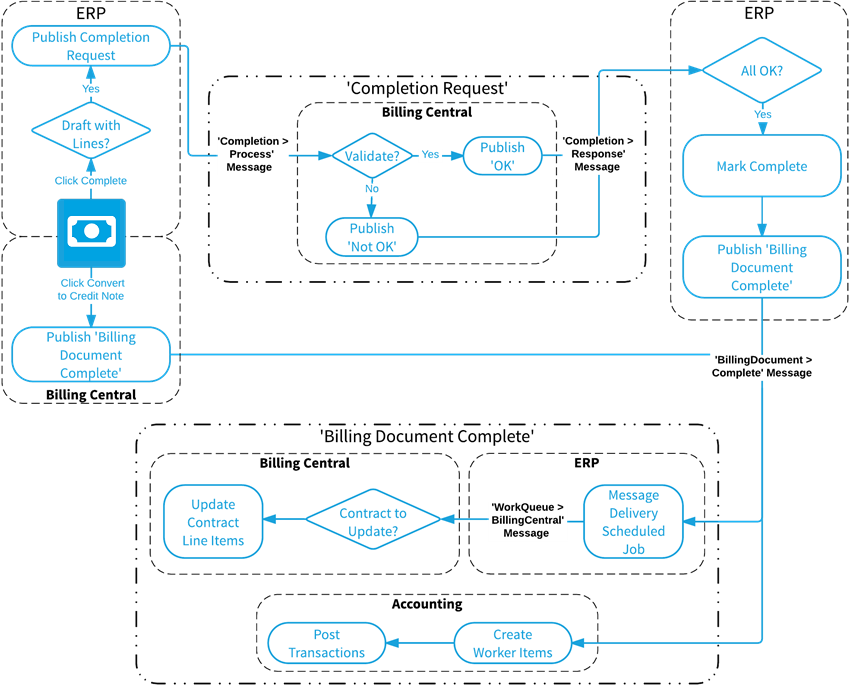
Several ERP publications and subscriptions are provided as features to enable FinancialForce Accounting transactions to be created when you complete a billing document:
|
Feature |
Description |
|---|---|
| FinancialForce Accounting Publications and Subscriptions | Creates the FinancialForce Accounting publications required to complete billing documents. |
| BC Publications and Subscriptions | Creates the FinancialForce Billing Central publications required to complete billing documents. |
| ERP Publications and Subscriptions | Creates the ERP publications and subscriptions required to complete billing documents. |
For information about enabling features in Feature Console, see Enabling and Disabling Features.
When you click Complete or Convert to Credit Note on a billing document, several messages are passed between ERP, Billing Central, and Accounting.
Click the image to expand it.
ERP publishes this message when you click the Complete button on a draft billing document. Information published includes:
Billing Central subscribes to the completion process message and validates the billing document associated with a completion process message. Billing Central publishes a completion response message that indicates whether the billing document can be posted to Accounting transactions. Information published includes:
ERP subscribes to the completion response message and determines whether to mark the billing document complete and send a billing document complete message. These fields are populated in the subscription:
When ERP publishes the Billing Document Complete message, Accounting and Billing Central subscribe to that message to post accounting transactions and update related contract line items. This information is included in the publication:
These fields are populated by the related subscription:
|
Object |
Field |
|---|---|
| Billing Document | Accounting Transaction |
| Accounting Company | |
| Match Type | |
| Outstanding Value | |
| Period | |
| Posting Error | |
| Posting Status | |
| Year | |
| Billing Document Line Item | Match Type |
| Outstanding Value |