You can configure Revenue Management to store currency exchange rates at the time when a source record's revenue or cost is first deferred. These exchange rates are then used when Revenue Management calculates amounts to recognize or amortize. This means that currency exchange gains and losses do not occur because the same exchange rates are used throughout the source record's lifetime.
Revenue Management can store values in two currencies in addition to the source record's currency (known as document currency):
- Home currency - this is your accounting company's main working, and reporting, currency.
- Dual currency - this is typically a corporate currency used for reporting purposes.
In the example below, Merlin US is the corporate headquarters of an international company with separate divisions in the UK, Spain, and Australia. Merlin US does all its business in USD. Merlin UK, Merlin Spain, and Merlin Australia each do business in their local currency (GBP, EUR, and AUD respectively) but submit reports to their parent company in USD.
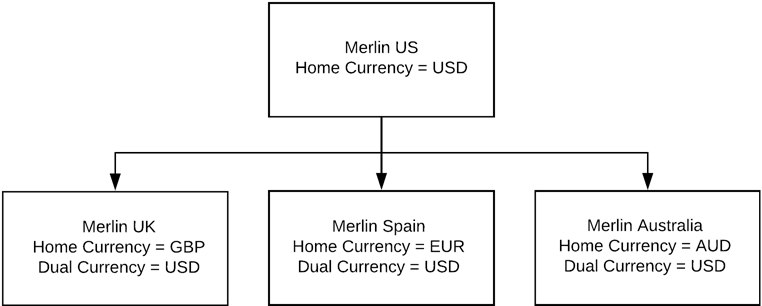
Let's assume you are recognizing revenue for Merlin UK and your source records are expenses. A contractor working in Norway might enter their expenses in Norwegian krone. So the document currency is NOK (assuming that NOK is a valid currency in your Salesforce org).
Revenue Management uses:
- Document Rate to convert the amount in document currency (NOK) to home currency (GBP).
- Dual Rate to convert the amount from home currency (GBP) to dual currency (USD).
All three values (document, home, and dual) are stored on the resulting Revenue Recognition Transaction Lines.
Configuring Settings to Store Multiple Exchange Rates
If you want to use the functionality described above, when creating settings records you must supply the API names of fields on your source records that contain:
- Document Currency
- Home Currency
- Dual Currency
- Document Rate
- Dual Rate
For more information about creating settings records, see Creating Settings Records and Settings Fields.