 SECTIONS
Before you can use the Services to Salesforce CPQ Integration, you must:
- Set up Services CPQ. For more information, see Setting up Services CPQ.
- Install and set up Salesforce CPQ. For more information, see the Salesforce Help.
- Assign the FF Group - SCPQ (CPQ Integration) - Estimator permission set to the users who will be using the integration.
- Enable the Services to Salesforce CPQ Integration feature.
- Add the Estimate Product field to the quote line editor.
Data Model
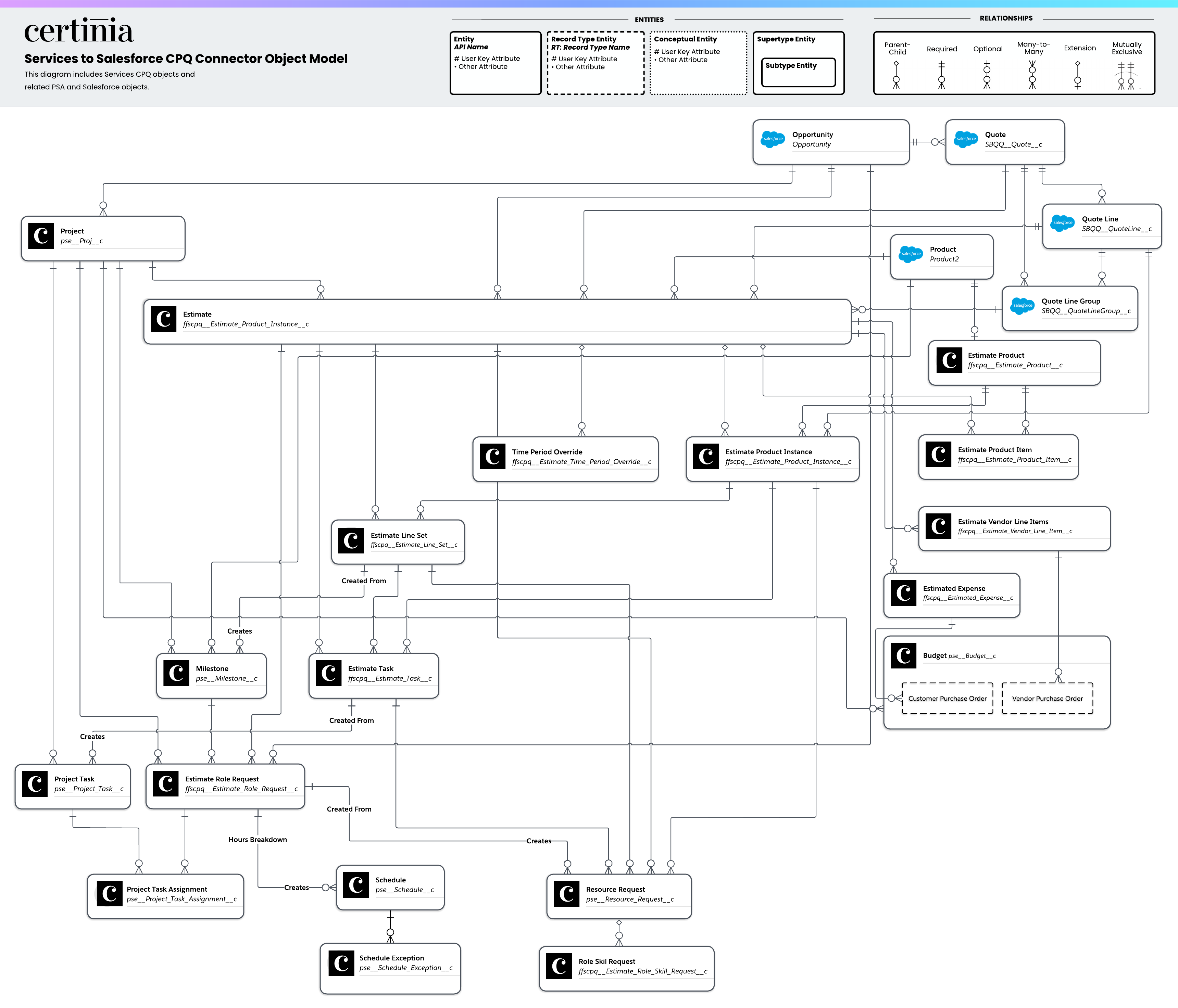
This entity relationship diagram (ERD) illustrates the relationship between objects in Services CPQ, PSA, and Salesforce objects. Certinia's ERDs use crow foot's notation. For more information, see "About Entity Relationship Diagram Notation" in the Salesforce Help.
Click the image to open it in a new tab.
Services to Salesforce CPQ Integration Lightning Components
Certinia provides the following custom Lightning components for use with the Services to Salesforce CPQ Integration:
| Component Name |
Description |
Lightning Record Page |
Further Information |
|---|---|---|---|
| SCPQ Actions: Quotes |
Contains an action to push an estimate to a Salesforce quote. |
Estimates | Pushing an Estimate to a Quote |
Permissions
You must assign the following permission set group to users for access to the Services to Salesforce CPQ Integration:
| Permission Set Group Name |
Description |
|---|---|
| FF Group - SCPQ (CPQ Integration) - Estimator | Includes the CPQ - Push Estimate to Quote permission set. |
For more information about permission set groups, see PSA Functional Permissions Overview.
Feature Console
You must enable the Services to Salesforce CPQ Integration feature, which configures the integration by:
- Creating quote template records for viewing Services CPQ information in Salesforce CPQ quote documents.
- Creating a custom action named Create Estimate in Salesforce CPQ and adds it to the quote line editor.
- Overriding the New quick action for the Estimate object to include a lookup to a quote when creating an estimate.
For more information about enabling this feature, see Enabling and Disabling Features.
Assign Estimate Page Layout
In Lightning App Builder, set the Estimate Record Page (Salesforce CPQ Integration) as the org default for the Estimate record page. For more information about assigning page layouts as the org default, see the Salesforce Help.
Add Estimate Product Field to Quote Line Editor
To view the estimate product that a product has been created from in the Salesforce CPQ quote line editor, add the Estimate Product field to the Line Editor field set on the Quote Line object.