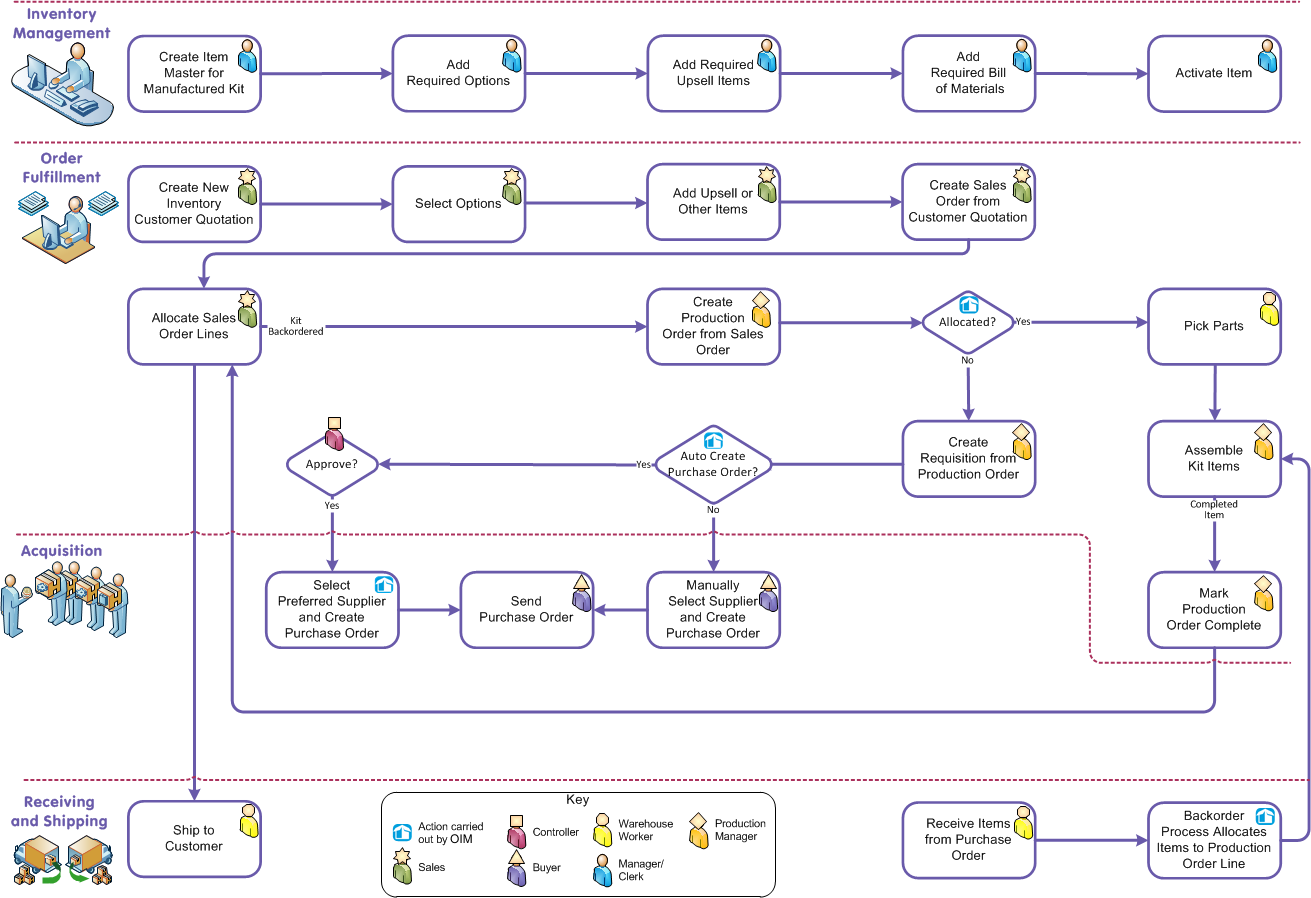
Creating an Item Master Adding Item Options to an Item Master Adding Upsell Cross Sell Items Creating a New Bill of Materials Setting the Active Status on an Item Master Creating a Customer Quotation Selecting Options on a Customer Quotation Line Selecting Upsell Items on a Customer Quotation Line Creating a Sales Order from a Customer Quotation Allocating inventory to a Sales Order Line Creating a Production Order from a Sales Order Pick Parts Creating a Requisition from a Production Order Shipping Items to the Customer Creating a Purchase Order Receipt Assemble Kit Items Mark Production Order Complete Creating a Purchase Order from a Requisition Sending a Purchase Order

Configure to Order

You can convert a configured item to a production order and schedule it for assembly. The diagram that follows shows an example workflow that uses this functionality.

Click a box in the diagram to display a corresponding topic. To return to this page, click this page in the contents pane or the back button on your browser

Note:

To select more than one option per option type for a single customer quotation line, the Allow Multiple Selection of Options checkbox must be selected in the Advanced Quoting Settings custom setting. See Allow Multiple Selection Of Options

You can only create production orders from a sales order for items that are configurable manufactured kits. For non configurable manufactured kits, use the standard production order process.