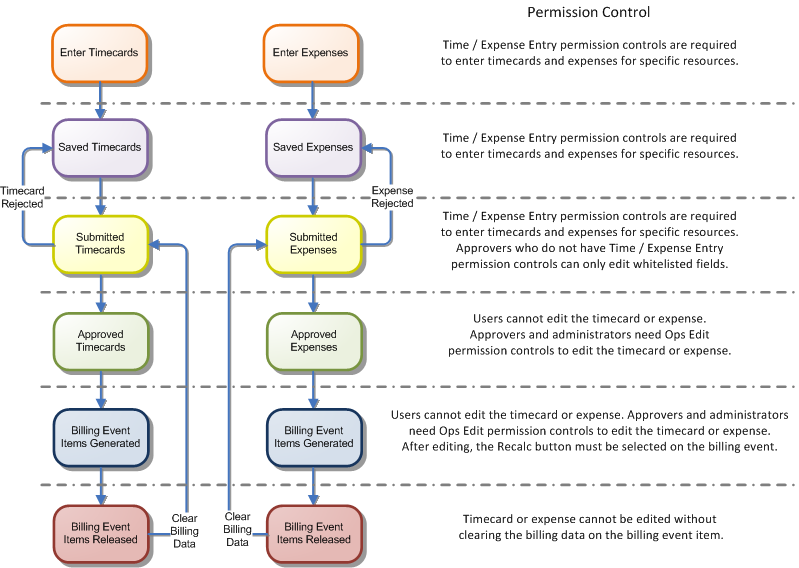
Ops Edit permission controls allow you to assign permissions to edit timecards and expenses after they have been approved or included in financials, but before the related billing event has been released.
To be able to edit timecards or expenses in this situation, you must have Ops Edit permissions on the RPGAbbreviation of region, practice, group. of the project to which the timecard or expense relates. The diagram that follows shows the lifecycle of timecard and expenses and the permission controls required to edit them during each stage.
Depending on your timecard or expense workflow, timecard approvers do not normally have permission to edit timecard or expense records. You can configure PSA to allow approvers to edit certain fields of a timecard or an expense when they have been submitted for approval. For further information about these settings, see "Permission Control Settings".
© 2009-2015FinancialForce.com, inc All rights reserved. FinancialForce and FinancialForce.com are registered trademarks, and the FinancialForce.com logo is a trademark. Other product names appearing herein may be trademarks.
This document contains proprietary information of FinancialForce.com, inc and its licensors, and is subject to change without notice.