Before you can use Financial Report Builder, you must ensure that:
- You have the necessary licenses for Analytics and it is enabled in your user orgs. Contact the FinancialForce Onboarding team for assistance.
- You have the necessary licenses to use Business Analytics. For more information, see Licensing.
- Your administrator has enabled Analytics and Analytics templates in your org. For more information, see the Salesforce Help.
- You have configured Financial Analytics in your org and have data in the Financial Balances and Financial Transactions datasets.
Your administrator is responsible for managing your Analytics settings.
Financial Report Builder Permission Set
The Financial Report Builder permission set is required for Financial Report Builder users.
Using this permission set, you can perform the following actions in Financial Report Builder:
- Create a new financial statement using the Financial Statements tab. Available options are General, Balance Sheet, Income Statement, and Trial Balance.
- Create a customized report using the Reports tab.
- Configure a report component using the Reporting Component Configurations tab.
Configuring Filters in Financial Report Builder
By default, you can create up to five filters for reports created using the Financial Reports tab. You can increase this limit by editing the Lightning page layout for your report.
To do this, perform the following steps:
- Click
 | Edit Page.
 - Search for and select the Einstein Analytics Debug Logger from the Components panel.
- Drag and drop the Einstein Analytics Query Filter to your required location on the Lightning Record page layout.
- Click Save.
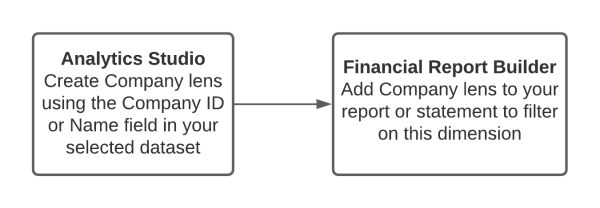
Filters are built using lenses. The field represented by that lens becomes the filter used in your report. For each filter, you must create an appropriate lens in Analytics Studio. For example, to create a company name filter in your financial report or statement, the following process is used: