 SECTIONS
Calculations in Plan Cells
The Formula Builder enables you to create formulas in plan cells. You can use formulas to perform simple or complex calculations, referencing cells within a plan or cells within another plan.
This might be useful in the following cases:
- When you want to sum the values of two cells
- When you want to increase or decrease the value of another cell
- When you want to count the number of cells that contain values and match a given criteria
- When you want to find the average, highest, or lowest value among cells that match a given criteria
You can use the Formula Builder in text mode and builder mode. For more information, see Text Mode and Builder Mode.
The Formula Builder image details the following:
- Labeled components of the Formula Builder, including buttons and icons
- Labeled components of a formula created in builder mode
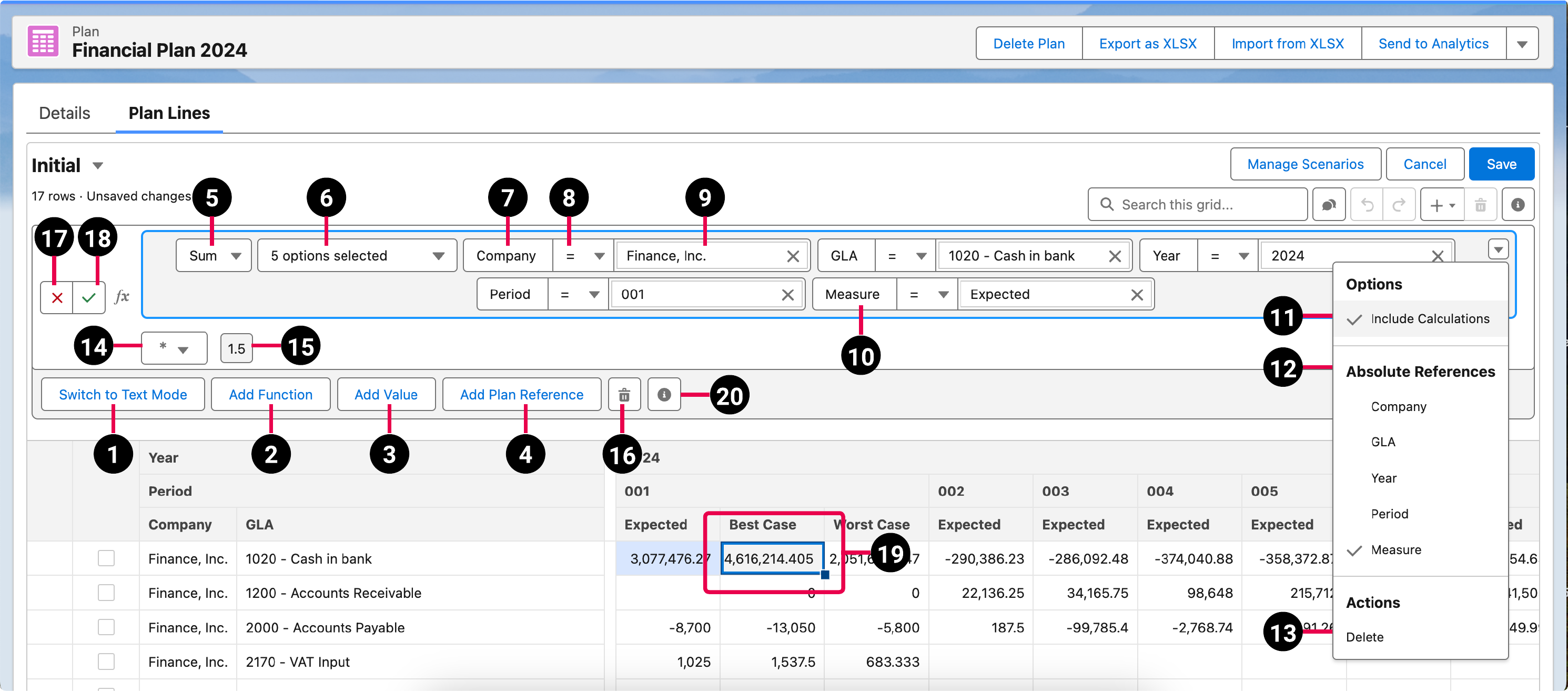
| Element Number | Description |
|---|---|
| 1 | Switches the Formula Builder to text mode. For more information, see Text Mode. |
| 2 | Adds a new function to the formula. For more information, see Functions. |
| 3 | Adds a new numeric value to the formula. |
| 4 | Adds a plan reference. |
| 5 | Enables you to select the function type. |
| 6 | The dimensions that the formula is filtered by. |
| 7 | The dimension referenced by the applied formula filters. |
| 8 | Indicates whether to include or exclude the value. |
| 9 | The value of the dimension referenced by the applied formula filters. For more information, see Filters. |
| 10 | The measure reference by the applied formula filters. |
| 11 | Allows you to select the operator. |
| 12 | Indicates the value. |
| 13 | Includes calculations. |
| 14 | Selects an absolute reference. |
| 15 | A segment representing a numeric value. |
| 16 | Deletes the highlighted segment in the Formula Builder. |
| 17 | Applies changes. |
| 18 | Discards changes. |
| 19 | The selected cell. |
| 20 | Provides a direct link to the Help. |
Filters
You can filter by dimensions to restrict and reference a particular cell. In addition, you can enable the use of absolute references. Absolute references maintain the formula structure that you've created, regardless of the cell location. For more information about adding or deleting filters, see Adding Calculations to Plan Cells in Text Mode.
Text Mode
Text mode enables you to create a formula by manually entering text. This is useful if you have experience creating formulas and want to build them from scratch.
This is an example of a formula created in text mode:
In this example, the sum of the cell whose company is Finance, Inc., GLA is 1020 - Cash in bank, year is 2024, and period is 001, and measure is Expected is being multiplied by 1.5. The absolute reference and include calculations options have also been selected.
Builder Mode
Builder mode enables you to create a formula using segments. We recommend you use builder mode if you have less experience creating formulas from scratch. See the screenshot above for an example of a formula created in builder mode.