 SECTIONS
If you intend recognizing revenue using revenue contracts, the Standalone Selling Price (SSP) must be populated on each of your source records.
These instructions explain how to build a Salesforce flow to populate the order product's Per Unit SSP field from the product's SSP field. Revenue Management can then multiply the order product's Per Unit SSP by the quantity specified on the source record to calculate the source record's SSP.
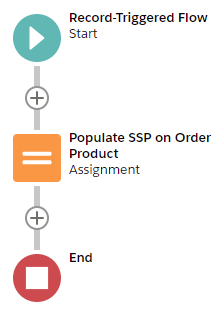
Here is an outline of the flow you will be building. (Click the image to expand it.)
Before You Begin
Before you begin you must enable the Enabling Revenue Cloud Connector feature in Feature Console. Make sure the Revenue Management on SF Revenue Cloud permission set is assigned to you.
You must also enable the Create Setup for Using Revenue Contracts feature. You can do this before or after building the flow.
Creating the Flow
- From Setup, navigate to Flows. Create a new flow of type Record-Triggered Flow. We recommend you use the Auto-Layout option to build the flow.
- Click the Start icon in the flow.
- Click Edit to configure the trigger. On the Configure Trigger window, set:
Trigger the Flow When: A record is created or updated
Run the Flow: Before the record is saved - Click Done.
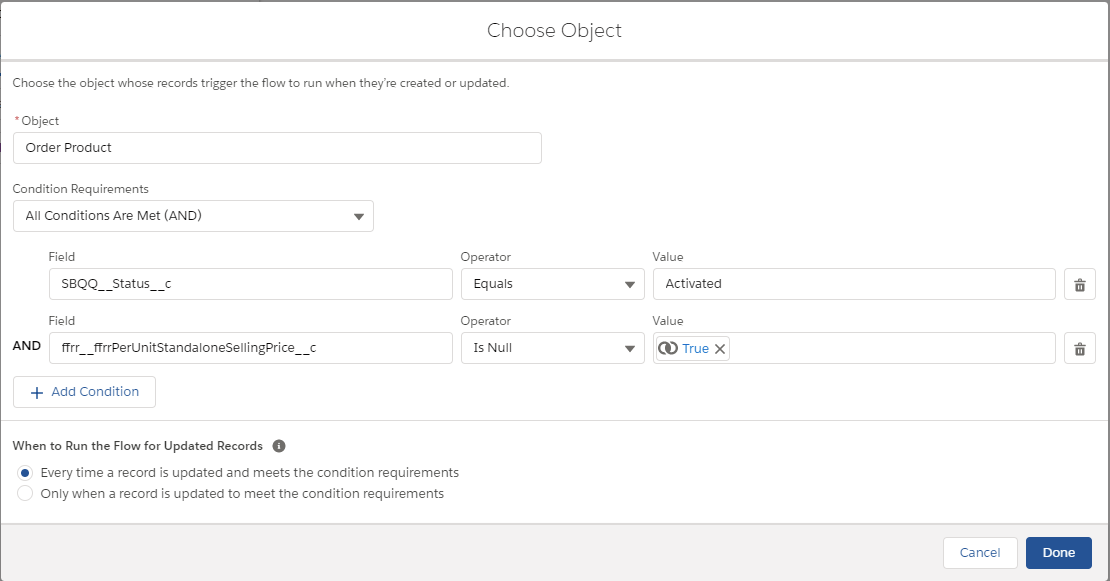
- Click Choose Object and complete the Choose Object window as follows:
Object: Order Product
Condition requirements: All conditions are met (AND)Then add the following conditions:
SBQQ__Status__c Equals ActivatedffrrPerUnitStandaloneSellingPrice__c Is Null TrueWhen to Run the Flow for Updated Records: Every time a record is updated and meets the condition requirements
- Click Done. Note that the
ffrrPerUnitStandaloneSellingPrice__c Is Nullcondition ensures that if the Per Unit SSP field is populated on the order product, the process does not run so the existing value is not overwritten. - Click the + symbol between the Start Icon and the End icon, then choose to add an Assignment element.
- Complete the New Assignment window as follows:
Label: Populate SSP on Order Product
API Name: Populate_SSP_on_Order_Product
Description: Populates the Standalone Selling Price for a single unit of the Product onto the Order Product - Set the following assignment in the Set Variable Values section:
{!$Record.ffrr__ffrrPerUnitStandaloneSellingPrice__c} Equals {!$Record.Product2.ffrr__ffrrStandaloneSellingPrice__c}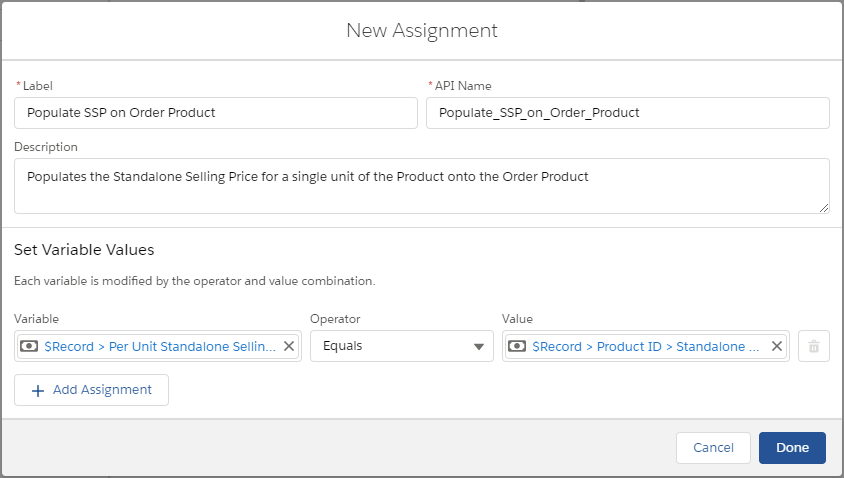
- Click Done.
- Save your flow then click Activate.
When you activate an order, each order product's Per Unit SSP field is populated from the related product's SSP field. Revenue Management then multiplies the order product's Per Unit SSP by the quantity specified on the source record to calculate the source record's SSP.