 SECTIONS
Plan Table Reference
The plan table enables you to interact with a plan and its scenarios. The table is displayed on a record page using the following Lightning components:
- WorkGrid Plan Table
- WorkGrid Embedded Plan
By default, the WorkGrid Plan Table component is available from the Plan Lines tab of the Plan record page.
The plan table contains the following areas that include buttons.
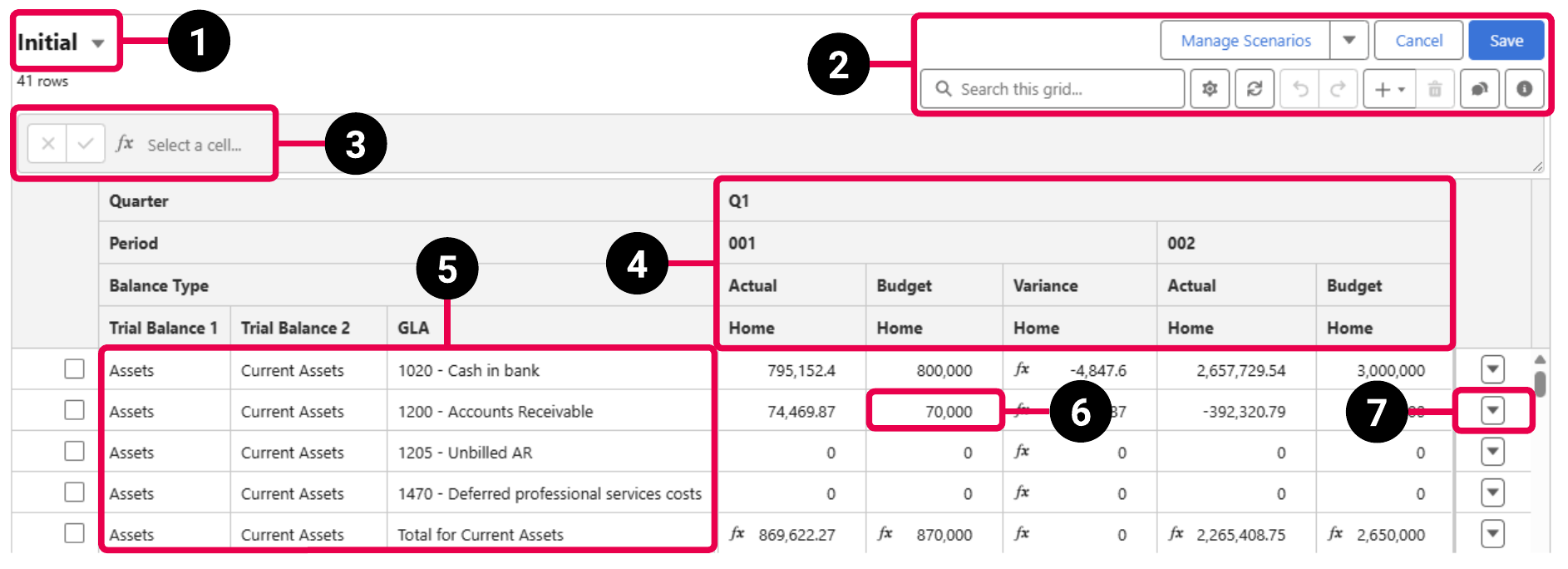
| Element Number | Area |
|---|---|
| 1 | Current scenario |
| 2 | Plan table toolbar |
| 3 | Formula Builder |
| 4 | Column header |
| 5 | Row header |
| 6 | Cell |
| 7 | Additional row actions |
More information about the buttons available in each section is provided below. For a description of the fields and buttons available on the Plan object, see Plan Fields.
Current Scenario Buttons
The following buttons are available in the current scenario section.
| Button | Description | Related Help Page |
|---|---|---|

|
Displays a list of the scenarios in the plan and enables you to switch to another scenario. | Switching Between Plan Scenarios |
Plan Table Toolbar Buttons
The following buttons are available in the plan table toolbar.
| Button | Description | Related Help Page |
|---|---|---|
| View in Planning |
Opens the plan's record page. |
— |
| Manage Scenarios | Opens the Manage Scenarios window that enables you to create, edit, and delete scenarios in the plan. | Plan Scenarios |
|
|
Displays a menu that enables you to perform additional actions related to scenarios. | — |
| Manage Relationships | Opens the Manage Relationships window that enables you to create, edit, and delete parent-child relationships where the current scenario is the child. | Relationships Overview |
| View Scenario History | Opens the Scenario History window that enables you to view a list of changes made to the scenario. | Viewing the History of a Plan Scenario |
| Cancel | Discards any unsaved changes to the plan table. | — |
| Save | Saves the changes to the plan table. | — |

|
Opens the Plan Display Settings window that enables you to change how the plan cells are displayed. | |

|
Updates the current scenario with the latest data from Analytics. |
Updating a Plan with the Latest Data from Analytics. |

|
Expands all the groups in the plan table tree so that all the rows are displayed. |
— |

|
Collapses all the groups in the plan table tree so that only the top-level rows are displayed. |
— |

|
Undoes the latest unsaved change. |
— |

|
Redoes the latest change that was undone. |
— |

|
Displays a menu that enables you to add new rows and columns to the plan table. | — |
| Insert Row | Adds a new row to the plan table. | |
| Insert Total Row | Adds a new total row to the plan table. | Inserting a Total Row in the Plan Table |
| Insert Column | Adds a new column to the plan table. | Inserting a Column in the Plan Table |
| Insert Total Column | Adds a new total column to the plan table. | Inserting a Total Column in the Plan Table |

|
Deletes the currently selected table rows. |
Deleting Multiple Rows from the Plan Table |

|
Displays the plan table in a window that occupies the full size of the screen. |
Editing a Plan from Another Record |

|
Closes the window that displays the plan table in full-screen mode. |
Editing a Plan from Another Record |

|
Displays all the comment threads in the plan scenario. | Viewing Existing Comment Threads |

|
Provides information about the plan table. | — |
Search Bar
The toolbar also contains a search bar that enables you to filter the plan table by entering a value. Only cells and row headers that contain the value you entered are displayed.
Formula Builder Buttons
For more information about the buttons available in the Formula Builder, see Calculations in Plan Cells.
Column Header Context Menu Buttons
The following buttons are available in a context menu when you right-click a column header.
| Button | Description | Related Help Page |
|---|---|---|
| Insert Column | Adds a new column to the plan table. | Inserting a Column in the Plan Table |
| Insert Total Column | Adds a new total column to the plan table. | Inserting a Total Column in the Plan Table |
| Delete Column | Deletes the column. | Deleting a Column from the Plan Table |
| Move Column Right | Moves the column one position to the right. | Changing the Position of a Column in the Plan Table |
| Move Column Left | Moves the column one position to the left. | Changing the Position of a Column in the Plan Table |
| Edit Planning Unit | Applies a Planning unit to all the cells in the column. | Applying a Planning Unit to a Column |
Row Header Context Menu Buttons
The following buttons are available in a context menu when you right-click a row header.
| Button | Description | Related Help Page |
|---|---|---|
| Insert Row | Adds a new row to the plan table. | |
| Insert Total Row | Adds a new total row to the plan table. | Inserting a Total Row in the Plan Table |
| Delete Row | Deletes the row. | Deleting a Single Row from the Plan Table |
| Move Row Up | Moves the row up by one position. | Changing the Position of a Row in the Plan Table |
| Move Row Down | Moves the row down by one position. | Changing the Position of a Row in the Plan Table |
| Edit Planning Unit | Applies a Planning unit to all the cells in the row. | Applying a Planning Unit to a Row |
Cell Context Buttons
The following buttons are available in a context menu when you right-click a cell.
| Button | Description | Related Help Page |
|---|---|---|
| Insert Total Row | Adds a new total row to the plan table. | Inserting a Total Row in the Plan Table |
| Delete Row | Deletes the row the cell belongs to. | Deleting a Single Row from the Plan Table |
| Delete Column | Deletes the column the cell belongs to. | Deleting a Column from the Plan Table |
| View Cell History | Opens the Cell History window that enables you to view a list of changes made to the cell. | Viewing the History of a Plan Table Cell |
| View Comments | Displays the comments associated with the cell. | Cell Comments in Plans |
| Edit Planning Unit | Applies a Planning unit to the cell. | Applying a Planning Unit to a Plan Cell |
| Make Adjustment | Opens the New Adjustment modal to enable you to make an adjustment. | Making Adjustments |
| Deactivate Adjustment | Deactivates the adjustment to the cell. | Deactivating Adjustments |
Additional Row Buttons
The following buttons are available in a context menu when you click next to a row.
| Button | Description | Related Help Page |
|---|---|---|
| Insert Row | Adds a new row to the plan table. | |
| Insert Total Row | Adds a new total row to the plan table. | Inserting a Total Row in the Plan Table |
| Delete Row | Deletes the row. | Deleting a Single Row from the Plan Table |
| Edit Planning Unit | Applies a Planning unit to all the cells in the row. | Applying a Planning Unit to a Row |
| Allocate | Allocates values across the cells in the row. | Allocating Amounts Across Plan Cells |