 SECTIONS
Viewing Project Details
The Project Details view of the PSA Project Scheduling Risk dashboard displays revenue or costs information specific to one project, which can be drilled down to the resource or role level for historical or future periods.
The Project Details view enables you to:
- Toggle to view information for historical and future project weeks.
- Toggle to view historical and future weeks information at Resource and Role level.
- Hover over bars in the chart to view hours information for resources and roles.
Historical Tab
The historical tab displays data for the selected number of past weeks, which displays in the tab title.
Resource View
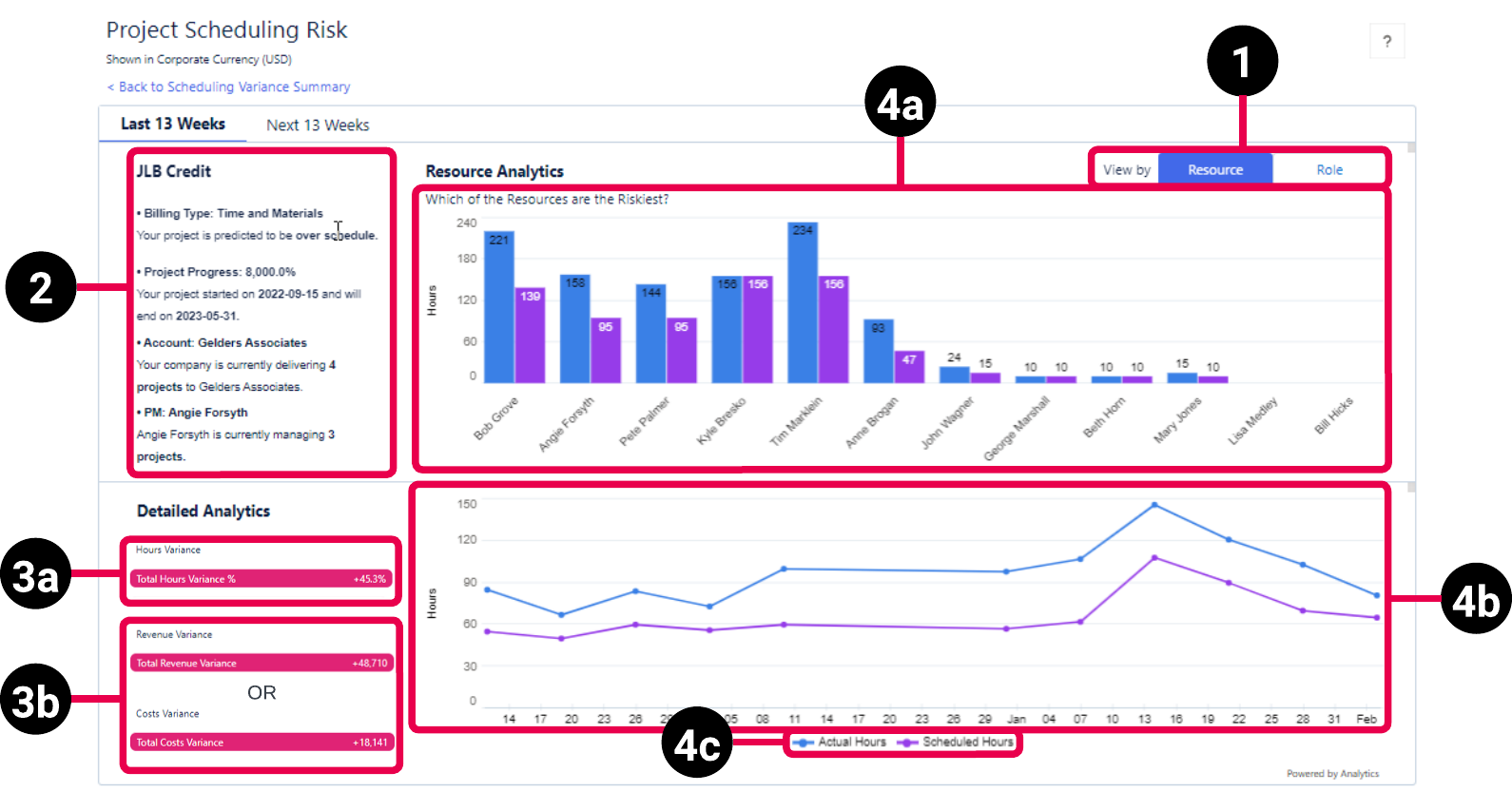
The Resource view of the historical weeks tab has the following elements.
Role View
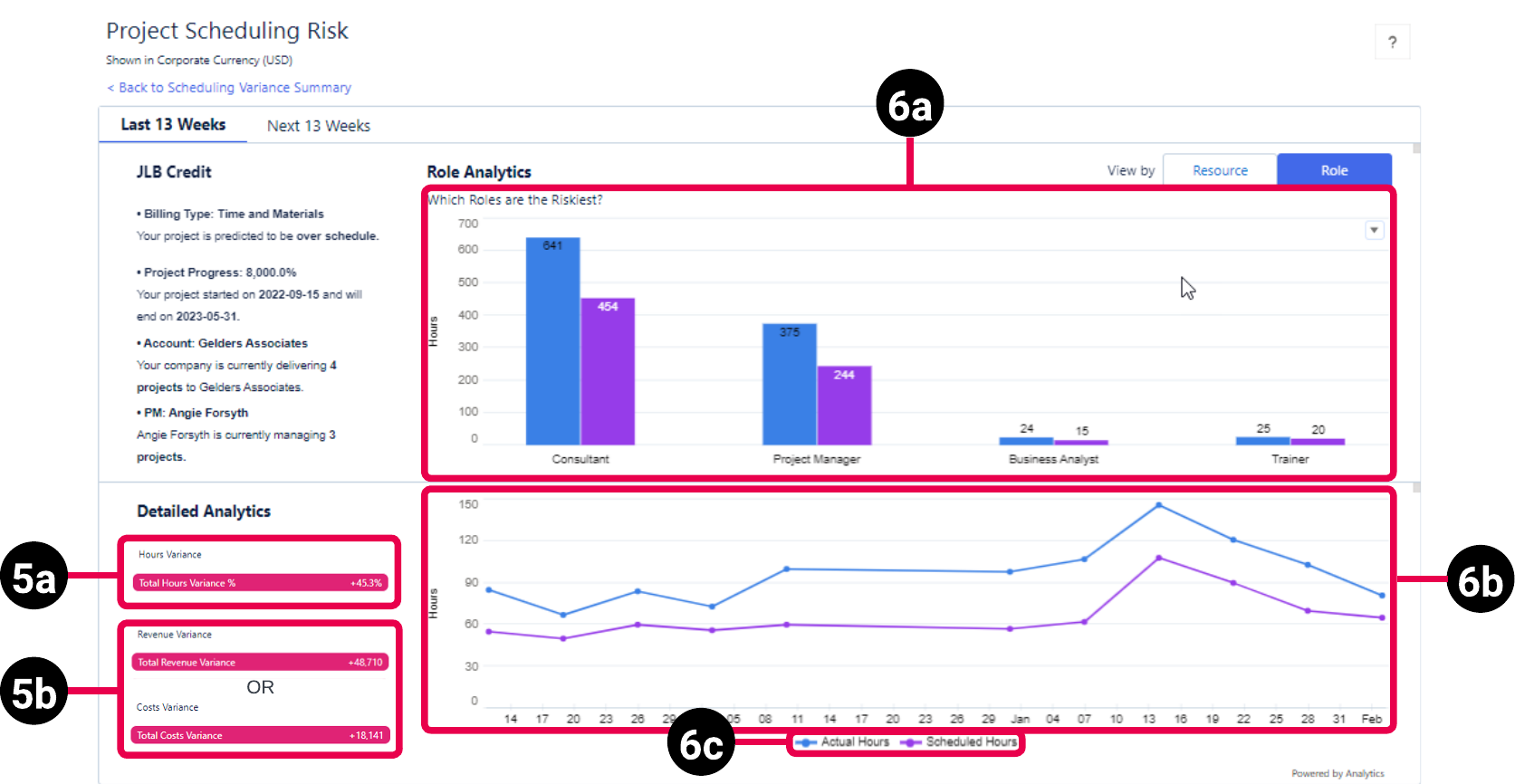
The Role view of the historical weeks tab has the following elements.
Future Tab
The future tab displays data for the selected number of future weeks, which displays in the tab title.
Resource View
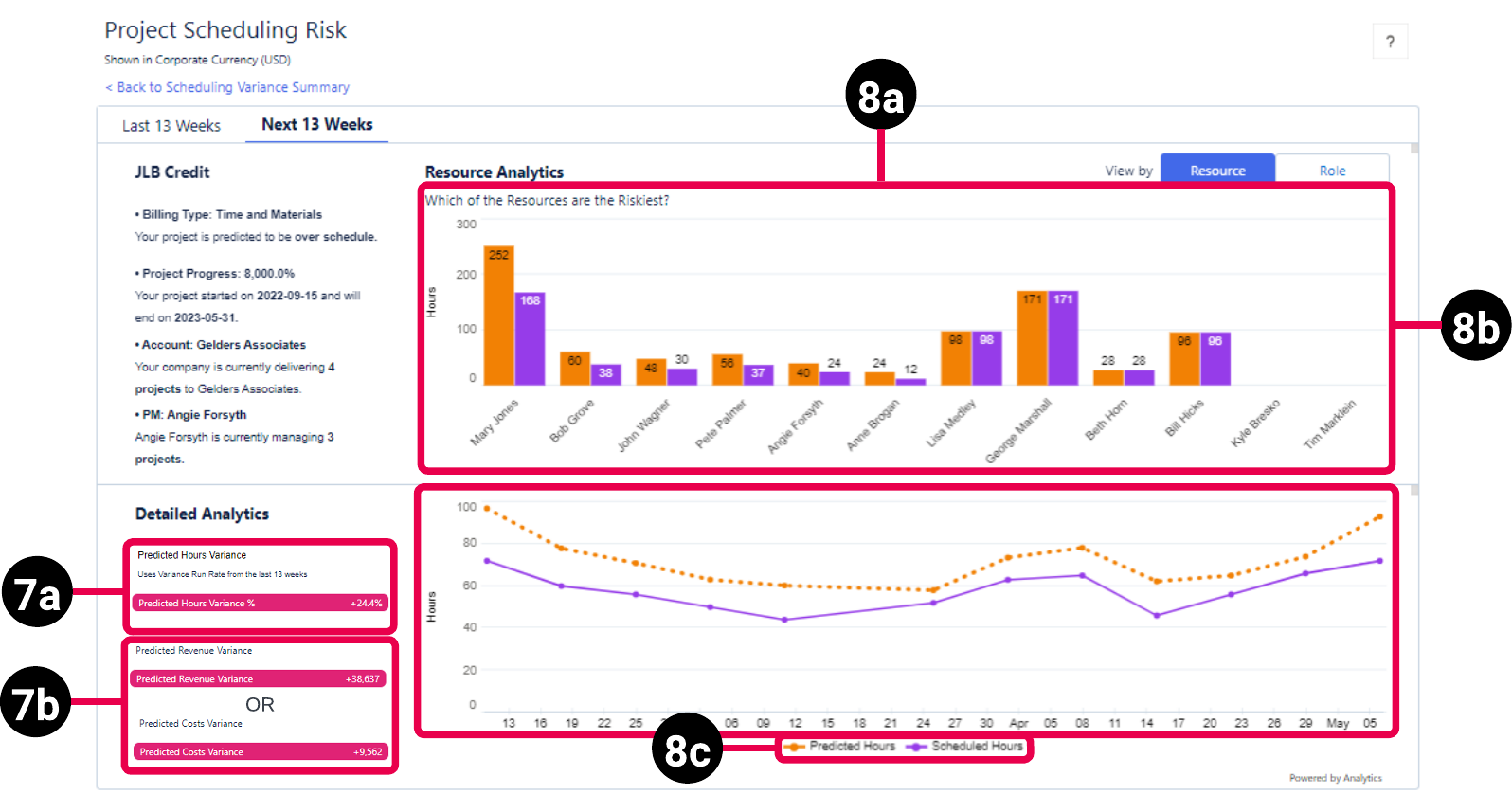
The Resource view of the future weeks tab has the following elements.
Role View
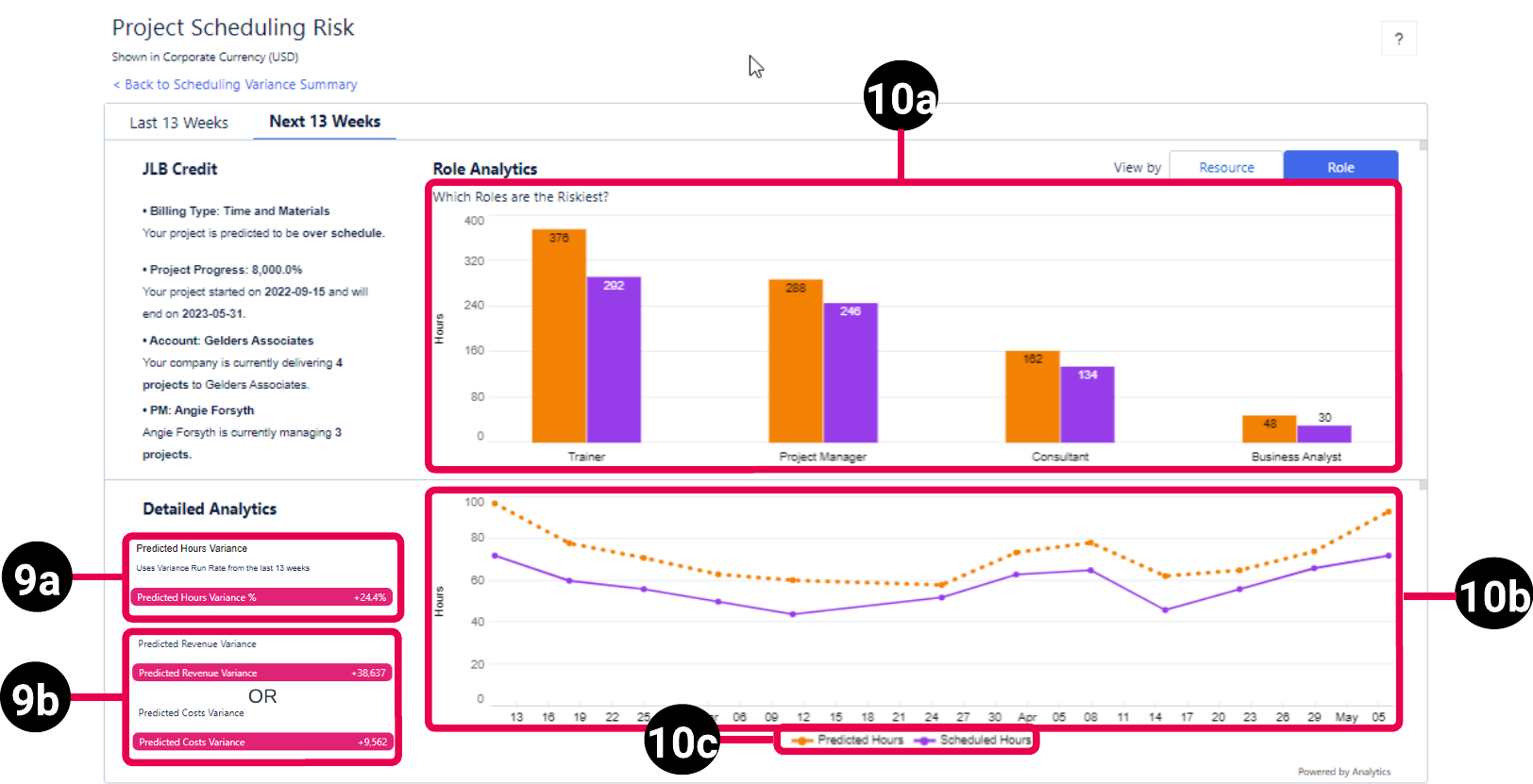
The Role view of the future weeks tab has the following elements.
| Element Number | Name | Description | Calculation | Referenced Calculation | Source Dataset |
|---|---|---|---|---|---|
| 1. | View By Resource or Role Picker | Determines if resource or role data displays in the dashboard. | Not applicable | Not applicable | Project Reporting Dataset Output Fields |
| 2. |
Project Details |
Displays the following information:
|
If you have planned hours for the project, then project progress percentage is calculated as:
If you don't have planned hours for the project, then project progress percentage = |
None | |
| Resource Analytics - Last XX Weeks | |||||
| 3a. |
Detailed Analytics |
Hours Variance, which is the percentage difference between the scheduled and actual hours, for all resources assigned to the project for the selected number of past weeks. |
Hours Variance = (Actual Hours - Scheduled Hours) / Scheduled Hours
|
Hours Variance= ( or
|
|
| 3b. |
Revenue Variance, which is the total difference between the estimated and actual revenue, for all resources assigned to the project for the selected number of past weeks. Revenue information displays when Project Revenue is selected in the View By Project Revenue or Project Costs Picker on the Scheduling Variance Summary page. |
Revenue Variance = Last XX weeks Actual Revenue - Last XX weeks Estimated Revenue | Revenue Variance = EvA Actual Billable Amount - EvA Scheduled Amount |
||
|
Costs Variance, which is the total difference between the estimated and actual costs, for all resources assigned to the project for the selected number of past weeks. Costs information displays when Project Costs is selected in the View By Project Revenue or Project Costs Picker on the Scheduling Variance Summary page. |
Costs Variance = Last XX weeks Actual Costs - Last XX weeks Estimated Costs | Costs Variance = EvA Actual Costs - EvA Scheduled Costs |
|||
| 4a. |
Resource Analytics - Bar Chart - Last XX Weeks |
Bar chart displaying the actual and scheduled hours for each resource assigned to the project for the selected number of past weeks. The resource whose variance has the greatest impact on revenue or costs is listed furthest left. Click on the bars for each resource to get the total hours variance % and total revenue variance. |
None | None | |
| 4b. |
Resource Analytics - Hours Variance Trend - Last XX Weeks |
Displays the actual and scheduled hours for the project for the selected number of past weeks. |
None | None | |
| 4c. | Chart Legend | Legend for the information displayed in the bar and line charts, which consists of actual and scheduled hours information for the resources assigned to the project, and for the project overall. | Actual Hours = EvA Actual Hours
Scheduled Hours = |
Not applicable | |
| Role Analytics - Last XX Weeks | |||||
| 5a. | Detailed Analytics |
Hours Variance, which is the percentage difference between the scheduled and actual hours, for all project roles for the selected number of past weeks. |
Hours Variance = (Actual Hours - Scheduled Hours) / Scheduled Hours
|
Hours Variance = ( or
|
|
| 5b. |
Revenue Variance, which is the total difference between the estimated and actual revenue, for all project roles for the selected number of past weeks. Revenue information displays when Project Revenue is selected in the View By Project Revenue or Project Costs Picker on the Scheduling Variance Summary page. |
Revenue Variance = Last XX weeks Actual Revenue - Last XX weeks Estimated Revenue | Revenue Variance = EvA Actual Billable Amount - EvA Scheduled Amount |
||
|
Costs Variance, which is the total difference between the estimated and actual costs, for all project roles for the selected number of past weeks. Costs information displays when Project Costs is selected in the View By Project Revenue or Project Costs Picker on the Scheduling Variance Summary page. |
Costs Variance = Last XX weeks Actual Costs - Last XX weeks Estimated Costs | Costs Variance = EvA Actual Costs - EvA Scheduled Costs |
|||
| 6a. |
Role Analytics - Bar Chart - Last XX Weeks |
Bat chart displaying the actual and scheduled hours for each project role for the selected number of past weeks. The role whose variance has the greatest impact on revenue or costs is listed furthest left. Click on the bars for each role to get the total hours variance % and total revenue variance. |
None | None | |
| 6b. |
Role Analytics - Hours Variance Trend - Last XX Weeks |
Displays the actual and scheduled hours for the project for the selected number of past weeks |
None | None | |
| 6c. | Chart Legend | Legend for the information displayed in the bar and line charts, which consists of actual and scheduled hours information for the project roles, and for the project overall. | Actual Hours = EvA Actual Hours
Scheduled Hours = |
Not applicable | |
| Resource Analytics - Next XX Weeks | |||||
| 7a | Detailed Analytics |
Predicted Hours Variance, which is the percentage difference between the scheduled and actual hours, for all resources assigned to the project for the selected number of future weeks. |
Predicted Hours Variance = Predicted Hours Variance / Scheduled Hours
|
Predicted Hours Variance =
Scheduled Hours =
|
|
| 7b. | Predicted Revenue Variance, which is the total difference between the estimated and actual revenue, for all resources assigned to the project for the selected number of future weeks. Revenue information displays when Project Revenue is selected in the View By Project Revenue or Project Costs Picker on the Scheduling Variance Summary page. |
Predicted Revenue Variance = Predicted Revenue - Estimated Revenue | Predicted Revenue Variance = EvA Scheduled Amount * Average Variance % for the selected number of past weeks
Estimated Revenue = |
||
| Predicted Costs Variance, which is the total difference between the estimated and actual costs, for all resources assigned to the project for the selected number of future weeks. Costs information displays when Project Costs is selected in the View By Project Revenue or Project Costs Picker on the Scheduling Variance Summary page. |
Predicted Costs Variance = Predicted Costs - Estimated Costs |
Predicted Costs =
Estimated Costs = |
|||
| 8a. |
Resource Analytics - Bar Chart - Next XX Weeks |
Bar chart displaying the predicted and scheduled hours for each resource assigned to the project for the selected number of future weeks. Predicted hours are based on the actual hours for the resource for the selected number of past weeks. The resource whose variance has the greatest impact on revenue or costs is listed furthest left. Click on the bars for each resource to get the predicted hours variance % and predicted revenue variance. |
None | None | |
| 8b. |
Resource Analytics - Hours Variance Trend - Next XX Weeks |
Bar chart displaying the predicted and scheduled hours for the project for the selected number of future weeks. Predicted hours are based on the actual hours for the project for the selected number of past weeks. |
None | None | |
| 8c. | Chart Legend | Legend for the information displayed in the bar and line charts, which consists of predicted and scheduled hours information for the resources assigned to the project, and for the project overall. | Predicted Hours = EVA Estimated Hours - (Average Variance % for selected number of past weeks * EVA Estimated Hours)
Scheduled Hours = |
Not applicable | |
| Role Analytics - Next XX Weeks | |||||
| 9a. | Detailed Analytics |
Predicted Hours Variance, which is the percentage difference between the scheduled and actual hours, for all project roles for the selected number of future weeks. |
Predicted Hours Variance = Predicted Hours Variance / Scheduled Hours
|
Predicted Hours Variance = EvA Estimated Hours (future) * (EvA Hours Variance (past) / EvA Estimated Hours (past))
Scheduled Hours =
|
|
| 9b. | Predicted Revenue Variance, which is the total difference between the estimated and actual revenue, for all project roles for the selected number of future weeks. Revenue information displays when Project Revenue is selected in the View By Project Revenue or Project Costs Picker on the Scheduling Variance Summary page. |
Predicted Revenue Variance = Predicted Revenue - Estimated Revenue | Predicted Revenue = EvA Scheduled Amount * Average Variance % for the selected number of past weeks
Estimated Revenue = |
||
| Predicted Costs Variance, which is the total difference between the estimated and actual costs, for all project roles for the selected number of future weeks. Costs information displays when Project Costs is selected in the View By Project Revenue or Project Costs Picker on the Scheduling Variance Summary page. |
Predicted Costs Variance = Predicted Costs - Estimated Costs |
Predicted Costs =
Estimated Revenue = |
|||
| 10a. |
Role Analytics - Bar Chart - Next XX Weeks |
Bar chart displaying the predicted and scheduled hours for each project role for the selected number of future weeks. Predicted hours are based on the actual hours for the resource for the selected number of past weeks. The role whose variance has the greatest impact on revenue or costs is listed furthest left. Click on the bars for each role to get the predicted hours variance % and predicted revenue variance. |
Not applicable | Not applicable | |
| 10b. |
Role Analytics - Hours Variance Trend - Next XX Weeks |
Bar chart displaying the predicted and scheduled hours for the project for the selected number of future weeks. Predicted hours are based on the actual hours for the project for the selected number of past weeks. |
Not applicable | Not applicable | |
| 10c. |
Chart Legend |
Legend for the information displayed in the bar and line charts, which consists of predicted and scheduled hours information for the project roles, and for the project overall. |
Predicted Hours =
Scheduled Hours = |
None | |