Migrating from Actuals to Recognition Schedules
This information is intended for existing Revenue Management users who want to migrate from using Actuals Refers to the original revenue recognition process where staging data is generated for source records. The Recognize Revenue page and Recognize All use this process. to using recognition schedules. If you are a new Revenue Management user, read Getting Started with Recognition Schedules.
For information about why we recommend you use Revenue Management with recognition schedules, see Revenue Management System Overview and Recognition Schedules and Calculations Overview.
Before You Migrate
Before you migrate from Actuals Refers to the original revenue recognition process where staging data is generated for source records. The Recognize Revenue page and Recognize All use this process. to recognition schedules, be aware of the following points:
- Recognition transactions created from recognition schedules are grouped according to the Company field mapping rather than the Grouped By field mapping on a source object's recognition settings.
- Once you have switched to using recognition schedules, you cannot discard recognition transactions that were created when recognizing revenue and cost against source records (via staging data).
- Recognition templates must have a revenue basis of Total Revenue, or a cost basis of Total Cost. Recognition schedules are not generated for source records with templates using a different revenue basis or cost basis.
- Recognition schedules are not generated for source records that have a "Use in Revenue Contract" recognition template A recognition template that has the Use in Revenue Contract checkbox enabled.. This is because recognition schedules will be generated against a revenue contract's performance obligations, not against the source records directly.
Migration Steps
To migrate to use the recognition schedules, perform the following steps:
- Set the specific date to end recognition using the legacy approach and begin using the new Recognition Schedules approach.
- Add the necessary fields to the relevant objects and recognition settings. For more information, see Additional Setup for Recognition Schedules.
-
If you have previously generated recognition schedules, you must delete them. This ensures that the opening balances are correct when you next synchronize recognition schedules.
- Navigate to Setup | Custom Settings | Revenue Management Settings.
- Set the Global Opening Balance Cutoff Date to the exact end date of the final legacy recognition period. For example, March 31, 2024. For more information, see Opening Balances for Recognition Schedules.
- Review and configure the Setting up Recognition Management.
- On the Revenue Recognition page, click Synchronize Recognition Schedules. This generates recognition schedules for all valid records in your org. A record is valid if it has a template, meets the recognition criteria, is not complete, and has a value to recognize. For more information, see Revenue Recognition Page.
- Navigate to Revenue Management Background Processes to monitor the schedule creation.
- Resolve any errors. Errors typically relate to the source records identified in the error message.
- [Optional] Set up process automation. For more information, see Using the Revenue Management Automation.
Benefits
- The enhanced interface uses supported technology, which allows for the development of future features.
- You can view revenue and cost recognition information immediately, without manually generating data for each combination of currency and revenue source.
- Information is consolidated into a single view rather than being spread across multiple instances.
- The recognition process requires fewer clicks and no manual input.
- Recognition schedules provide the forward-looking revenue information required for deferred revenue waterfall reporting.
- You can fully or partially automate your recognition process.
- You can place revenue recognition on hold when required.
Limitations
- When you move to the new Recognition Schedules user interface, you cannot edit the recognition amount directly in the user interface.
- The recognition amount is strictly controlled by the source record. To change the amount calculated, you must update the source record and regenerate the recognition schedule.
- If this change prevents you from adopting the feature, contact your Customer Success Manager.
Recognition Schedule Object Model and Calculations
The image below illustrates the recognition schedule object model and calculations:
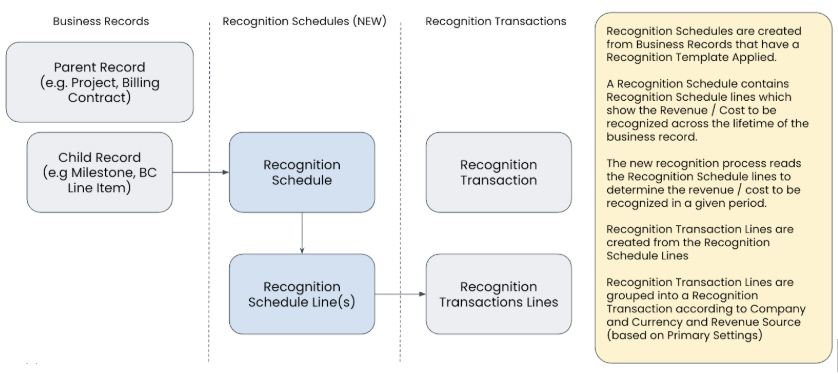
For more information about how recognition schedules are calculated, see Recognition Schedules and Calculations Overview.