 SECTIONS
CS Skills Overview
CS skills enable you to record skills and competencies that can then be associated with:
- CS Cloud resources to determine the skills and competencies they possess
- Playbooks to determine the skills and competencies a resource must have to be suitable for allocation to it
- Success plans to determine the skills and competencies a resource must have to be suitable for allocation to it
When you associate a skill with a resource, playbook, or success plan, you can also define the rating of the skill, which determines the level of competency that:
- The resource has in the skill
- Is required by the playbook
- Is required by the success plan
You can define skills and their ratings and then associate them with resources, playbooks, and success plans. This enables you to filter the resources available for allocation to playbooks and success plans based on their skills and skills ratings matching the requirements of the playbook and success plan.
Associating CS Skills with CS Cloud Resources
You can associate CS skills with CS Cloud resources from the Resource Skills tab or the CS Resource Skills related list of the resource's record page. You can also specify the rating of the skill to define the resource's level of competency in it, as follows:
- 0 - No Rating
- 1 - Limited Experience
- 2 - Some Experience
- 3 - Comfortable
- 4 - Strong
- 5 - Expert
Associating CS Skills with Playbooks
You can associate up to 15 CS skills with playbooks from the Playbook Skills tab or the Playbook Skills related list of playbook record pages. You can also specify the rating of the skill to define the level of competency a resource must have to be suitable for allocation to the playbook, as follows:
- 0 - No Rating
- 1 - Limited Experience
- 2 - Some Experience
- 3 - Comfortable
- 4 - Strong
- 5 - Expert
Associating CS Skills with Success Plans
You can associate up to 15 CS skills with success plans from the Success Plan Skills tab or the Success Plan Skills related list of success plan's record pages. You can also specify the rating of the skill to define the level of competency a resource must have to be suitable for allocation to the success plan, as follows:
- 0 - No Rating
- 1 - Limited Experience
- 2 - Some Experience
- 3 - Comfortable
- 4 - Strong
- 5 - Expert
Skills Filtering
When allocating resources to playbooks or success plan, you can filter for the most suitable resources based on the following criteria:
- Skills
- Skill sets
- Skill ratings matching the skills
- Skill ratings associated with the playbook
- Skill ratings associated with the success plan
All of the skills and skill sets associated with the playbook or success plan are available to filter resources by.
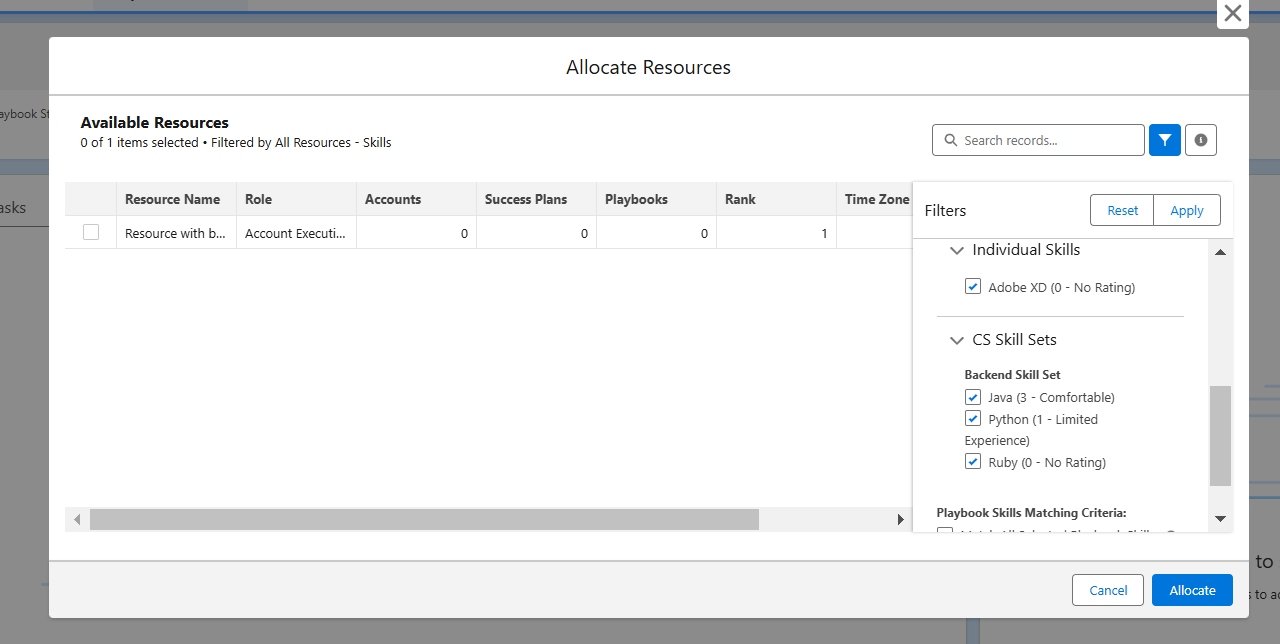
By default, all skills under the Individual Skills and CS Skill Sets sections are selected in the Filters panel. All the resources that match with at least one of the skills are displayed in the Available Resources table.
If you deselect a skill either in the Individual Skills section or CS Skill Sets section of the Filters panel, the resources that only match with the deselected skill are removed from the Available Resources table.
If you select only Match All Selected Playbook Skills, only the resources that match with all of the skills selected in the Playbook Skills section display in the Available Resources table. If you select only Match All Selected Success Plan Skills, only the resources that match with all of the skills selected in the Success Plan Skills section display in the Available Resources table.
If you select only Match or Exceed Skills Ratings, only the resources that match with at least one of the selected skills and match or exceed the skill's rating display in the Available Resources table. For filtering purposes, skills that don't have ratings applied to them are classified as 0 - No Rating.
If you select both Match All Selected Playbook Skills or Match All Selected Success Plan Skills and Match or Exceed Skills Ratings, only the resources that match with all of the selected skills and match or exceed each skill's ratings display in the Available Resources table. For filtering purposes, skills that don't have ratings applied to them are classified as 0 - No Rating.
Deleting Skills
You can delete skills from the CS skill's record page only. You can also remove skills from the skills tab or the related list of the playbook, resource, and success plan's record pages so that they are no longer associated with the record. However, removing the skill from the record does not delete the CS skill record, and it can be added to other records.