SECTIONS
Adding Deliverables to Projects
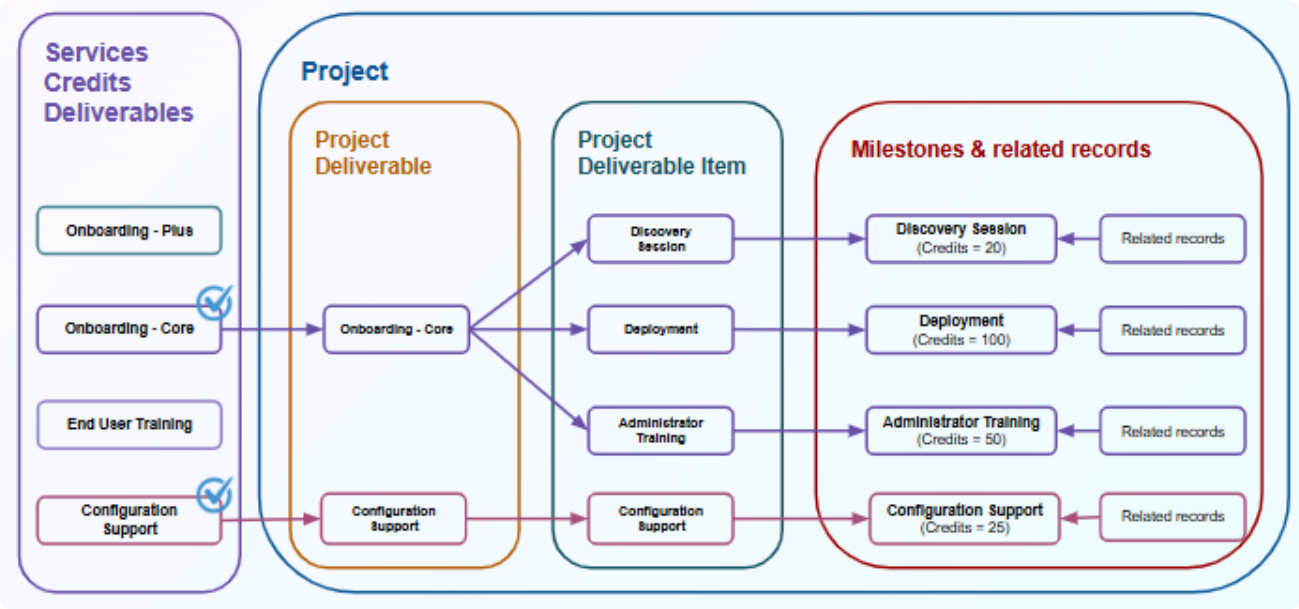
When you add a services credits deliverable to a project, a copy of the deliverable and its deliverable items are created in the project. Within the project, these are known as a project services credits deliverable with its project services credits deliverable items.
The milestone associated with each project services credits deliverable item is copied to the project, along with its related records.
The project services credits deliverable provides a snapshot of the deliverable at the time of adding it to the project. Any future changes or updates to the source deliverable will only apply to new project deliverables.
You can add services credits deliverables to the project using the ServicesDeliverableService API. This API enables you to:
- Add the milestones to the project synchronously.
- Add the related records asynchronously.
- Create project services credits deliverable and project services credits deliverable items synchronously.
Steps to Add Services Credits Deliverables to Projects
This section explains the overall process of adding services credits deliverables to projects.
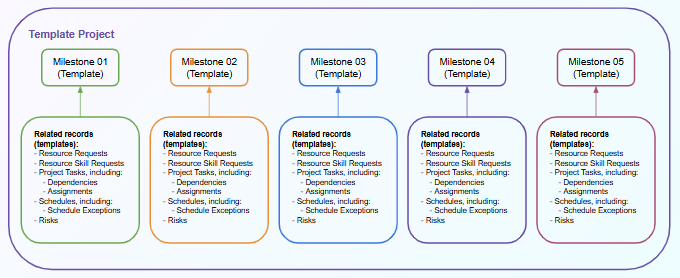
Step 1: If you want to create a services credits deliverable, create a template project. You can then add milestones to the template project and associated relevant records, such as resource requests and project tasks. You can create different template projects, if needed.
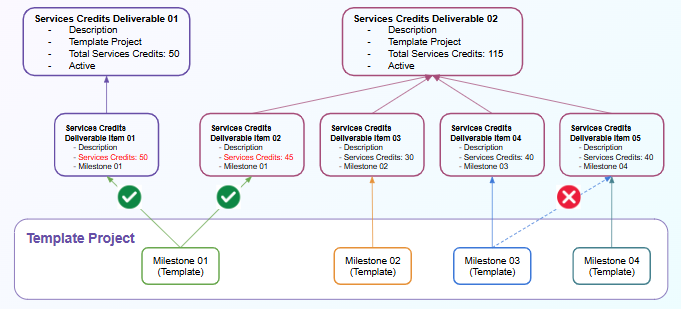
Step 2: You can define each of the services credits deliverables, which represent the items you would include in a services credits catalog. Each deliverable can be defined by one or more deliverable items, each of which is associated with the relevant template milestone. You need to specify the value of services credits when creating the deliverable item because it is not copied from the milestone. The same milestone can be associated with different deliverable items, as long as those items belong to different deliverables.
Step 3: You can add services credits deliverables to projects using the ServicesDeliverableService API, which generates the project services credits deliverables and associated project services credits deliverable items to the project. When adding deliverables to projects, the associated milestones and their related records get copied to the project. You can add deliverables that are associated with different templates to the same project.
The following records get copied across along with their related milestone when adding services credits deliverables to projects:
- Project Task
- Project Task Assignment
- Project Task Dependency
- Resource Request
- Resource Skill Request
- Risk
- Schedule
- Schedule Exception
Example
Your catalog includes two options for customers wanting to use their credits to pay for onboarding. The first option is the Onboarding - Core package, which includes a Discovery Session, Deployment activities, and a Training course for the System Administrator. The second option is the Onboarding - Plus package, which includes the same services in the Onboarding - Core package plus a Training Course for the End Users and also Configuration Support. These last two services (End User Training and Configuration Support) are also offered as standalone services.
You could use services credits deliverables to set up those services in PSA as follows:
-
You can create template milestones that represent what the services include:
- Milestone 1: Discovery Session
- Milestone 2: Deployment
- Milestone 3: Administrator Training
- Milestone 4: End User Training
- Milestone 5: Configuration Support
- Then, you can create the Resource Requests, Project Tasks, etc. required to complete each of those milestones.
-
Once the template milestones and their related records are set up, you can define services credits deliverables.
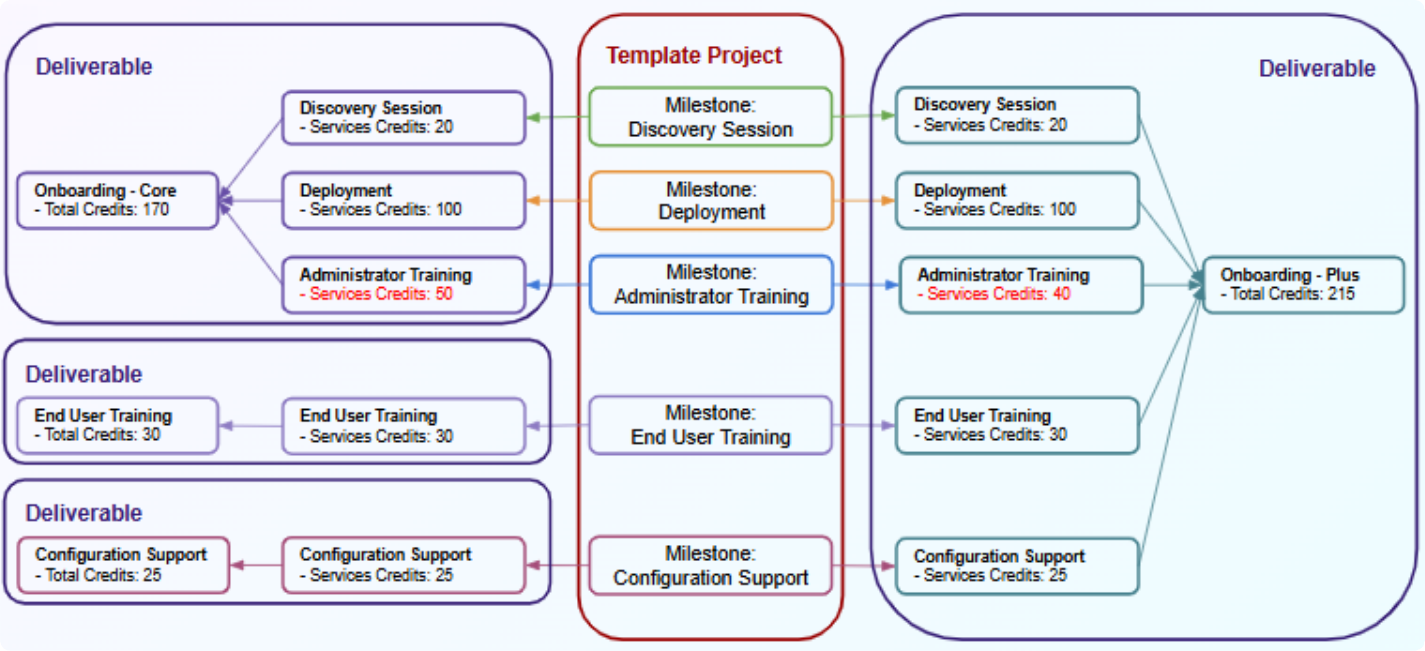
- When your services credits deliverables are set up, you can add them to any project. So, if one of your customers requests the Onboarding - Core Package and also wants the Configuration Support service, you can add those two deliverables to the project. See the image below: