Applications and Tabs

The PSA applications listed in the applications selection box and the tabs within them depend on the options that your administrator has set on the profile to which you have been assigned.
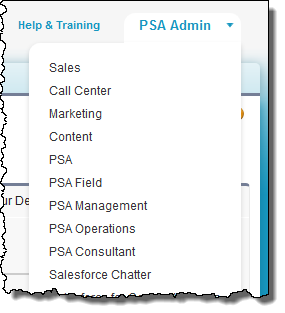
Diagram illustrating PSA Applications and Tabs

For example, the PSA applications can be configured like this:

Configuring PSA Applications
App Purpose
PSA Admin Contains tabs that allow PSA administrators to configure and administer PSA.
PSA Field Contains tabs that allow a user to create, view and edit projects, resource requests, assignments, timecards, expense reports and skills or certifications.
PSA Management Contains the tabs that allow a user to manage PSA.
PSA Operations Contains the tabs for an operations user.

The following shows an example of the tabs that can be listed in each PSA application.

Lightning

To view these apps in Lightning:

  1. Click Setup.
  2. Search for and select App Manager
  3. Select the app from the list.
  4. Select Edit from the actions available in the right column arrow.
  5. Under Assign To User Profiles, select the profiles who will have access to the app.
  6. Click Save.

Classic

If you have the permissions to do so, you can change the tabs that appear in each custom App by clicking + to display the All Tabs page. You can also display a tab that is not listed in a PSA application using the All Tabs + page. See the Salesforce Help for more information.

Tabs

Configuring PSA Tabs
Tab PSA - Admin PSA - Field PSA - Operations PSA - Management Related Help Topic
Accounts     Applicable Applicable Setting up Accounts and Opportunities
Actuals Verifier Applicable       Recalculating Actuals with the Actuals Verifier
App Logs Applicable       App Logs Overview
Assignments   Applicable Applicable Assignments and Schedules Overview
Billing Event Generation     Applicable   Services Billing Overview
Configuration Groups Applicable       Managing Configuration
Configuration Options Applicable       Managing Configuration
Configuration Values Applicable       Managing Configuration
Contacts     Applicable Applicable Contacts and Resources
Currencies Applicable       Currency
Currency Exchange Rates Applicable       Currency
Estimates Vs Actuals     Applicable   Estimates Versus Actuals
Expense Limits / Rates Applicable       Expense Limits and Rates
Expense Reports   Applicable   Applicable Expense Reports
Forecasts       Applicable About Forecasting
Holidays Applicable       About Time Periods, Work Calendars, and Holidays
Missing Timecards     Applicable   Missing Timecards
Permission Controls Applicable     Applicable Permission Controls
Project Actuals Recalc Applicable       Recalculating Resource and Project Actuals
Projects   Applicable Applicable Applicable Projects
PSA Administration Applicable       PSA Administration
Rate Cards Applicable   Applicable   Rate Cards Overview
Region, Practice, Group     Applicable Applicable Regions, Practices and Groups
Resource Actuals Recalc Applicable       Recalculating Resource and Project Actuals
Resource Requests   Applicable Applicable   Resource Requests Overview
Skill or Certification Matrix Applicable Applicable     Skills Management Overview
Skill or Certification Zones Applicable       Skills Management Overview
Skills Capacity     Applicable Applicable Skills Management Overview
Time Periods Applicable       About Time Periods, Work Calendars, and Holidays
Timecards   Applicable   Applicable Timecards
Transaction Deltas Applicable       Transaction Deltas
Vendor Invoices     Applicable   Vendor Invoices
Work Calendars Applicable       About Time Periods, Work Calendars, and Holidays