Generating Depreciation Schedules for a Fixed Asset
To calculate depreciation:
The status of the asset must be Approved or Active. If the status of the asset is Active, you cannot generate depreciation for accounting books if the depreciation schedules have been exported to a financial accounting system.
At least one depreciation book must be associated with the asset.
Generating Depreciation Schedules from a Fixed Asset
To generate the depreciation schedules for all the depreciation books associated with a fixed asset:
Display the fixed asset that you want to generate the depreciation schedules for.
Complete these fields on the Fixed Asset Detail page if you have not already done so:
Asset Cost
Date Acquired
Date in Service
Business Use Percent (required for MACRS tax)
If the asset does not contain any depreciation books, create the depreciation books you want. See Creating Depreciation Books.
Click Generate Depreciation Schedule.
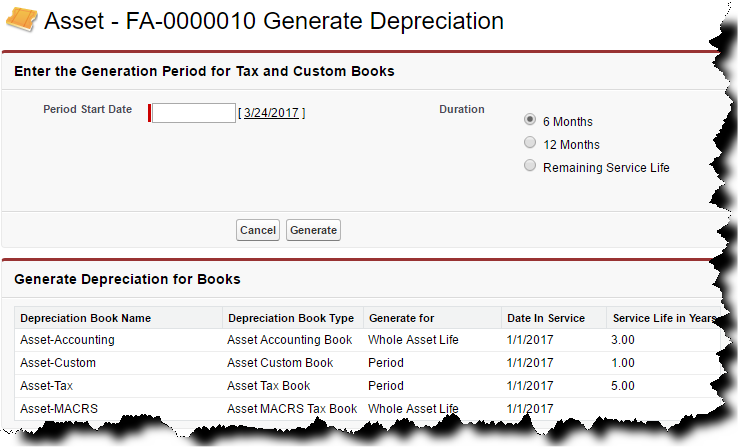
If the asset contains a tax or custom book, an additional page appears:
Click the image to expand it.
In the Period Start Date field, enter the date on which depreciation is to be calculated from. You must enter a period start date that falls on or after the Date in Service, but before the end of the service life. There must not be any gaps in the depreciation schedules.
Select the duration for which you want to calculate depreciation.