 SECTIONS
Weighting Resource Search Fields Individually
Resource search fields provide a way for you to use contact fields as filter criteria when searching for resources. By default, all resource search fields have the same weighting. This weighting is derived from the Custom Filter Fields Weighting in the Resource Search Service custom setting (unless a resource search settings record applies). Initially the Custom Filter Fields Weighting is set to Essential, which means that resources must match all your resource search fields to be considered as potential matches for a resource request.
You can edit the Custom Filter Fields Weighting to be Ideal, Desirable, or Suggested but the chosen weighting is still applied to all your resource search fields. If you want different resource search fields to have different weightings, you must create resource search field weightings.
Before you create resource search field weightings:
- You must create resource search fields for the contact fields you want to use as filter criteria. For more information, see Resource Search Fields Overview.
- You must be using staffing preferences and resource search settings records for your resource matching processes. For more information, see Staffing Preferences Overview.
What is a Resource Search Field Weighting?
A resource search field weighting links a resource search field to a resource search settings record at a particular weighting. The same resource search field can be linked to multiple resource search settings records at different weightings.
For example, in the diagram below the resource search field named Has Passport is weighted as Essential when linked to the Find Senior Engineers resource search settings record, but is weighted as Suggested when linked to the Find Junior Engineers resource search settings record:
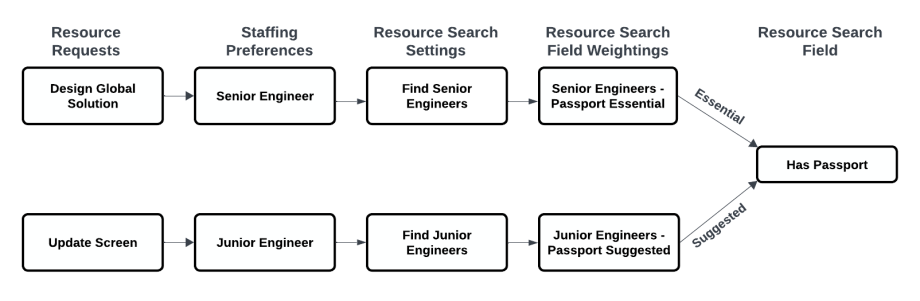
This means that:
- When you staff the Design Global Solution resource request which requires a senior engineer, only resources that match the Has Passport filter criteria are considered for matching to the resource request.
- When you staff the Update Screen resource request which requires a junior engineer, resources that do not match the Has Passport filter criteria are still considered for matching to the resource request provided that they match all essential criteria.
For more information about the weighting of filter criteria, see Intelligent Staffing Overview.
Creating Resource Search Field Weightings
To create resource search field weightings for a resource search settings record:
- Click the Resource Search Settings tab.
- Open the appropriate resource search settings record for editing.
- In the Resource Search Field Weightings related list, click New.
- Enter a name for the weighting.
- Select the resource search field that the weighting will apply to.
- Select the weighting that you want to apply.
- Click Save.
The field weighting is applied when the resource search settings record is used for resource matching, as explained in Resource Matching with Individually Weighted Custom Fields.
You can also create field weightings from the Resource Search Field Weightings tab. When using this tab, you must select the resource search settings record that the weighting relates to.
Resource Matching with Individually Weighted Custom Fields
This section explains what happens when you match a resource request that has a staffing preference linked to a resource search settings record with correctly configured field weightings.
Using Auto-Staffing
When you match the resource request using auto-staffing, the field weightings are applied to find a suitable resource.
Using The Resourcing Tab on a Resource Request
When you match the resource request using the Resourcing tab, the Match Settings panel is populated according to the selected resource search settings record which defaults to the one linked to the resource request's staffing preference. The Field Weightings section of the panel is populated according to the resource search field weightings linked to that resource search settings record.
You can adjust the weightings by editing them in the Field Weightings section of the panel.
You can also change the selection in the Resource Search Settings lookup if you want to apply a different settings record. If you clear the Resource Search Settings lookup, the match settings defined in the Resource Search Service custom setting apply and all the resource search fields are weighted according to its Custom Filter Fields Weighting.
Using Resource Request Staffer
When you match the resource request using Resource Request Staffer and the Respect Staffing Preferences checkbox is selected in the Settings panel, the field weightings are applied to find a suitable resource. If Respect Staffing Preferences is not selected, the weightings displayed in the Settings panel are applied. The values in the Settings panel are preset from the Resource Search Service custom setting.