The forecast calculation has two main objects:
It requires the backlog process to be run in order to generate the information that it needs. When a forecast calculation is run, it first initiates the backlog process automatically.
The calculated values are achieved as shown in the following table:
Contains the summary of projects and opportunities for each RPGAbbreviation of region, practice, group. level they relate to.
The records in here are calculated by the following processes:
Where:
Scheduled Hours are calculated with a start date using the latest of:
Scheduled Hours are calculated with an end date using the earliest of:
Revenue is calculated based on scheduled hours or days, using the assignment bill rate to get the value for the Scheduled Assignments (Hours/Days * Bill Rate = Scheduled Assignment Revenue).
Where:
Scheduled Hours are calculated with a start date using the latest of:
Scheduled Hours are calculated with an end date using the earliest of:
Bill rate is obtained from a defined bill rate field from the backlog calculation, suggested bill rate from resource request, requested bill rate from resource request or 0, whichever has a value evaluated in that order.
Revenue is calculated based on scheduled hours or days, using bill rate to get the value for the Scheduled Held Resource Requests (Hours/Days * Bill Rate = Scheduled Held Resource Request).
Where:
Scheduled Hours are calculated with a start date using the latest of:
Scheduled Hours are calculated with an end date using the earliest of:
Bill rate is obtained from a defined bill rate field from the backlog calculation, suggested bill rate from resource request, requested bill rate from resource request or 0, whichever has a value evaluated in that order.
Revenue is calculated based on scheduled hours or days, using bill rate to get the value for the Scheduled Unheld Resource Requests (Hours/Days * Bill Rate = Scheduled Unheld Resource Request).
Where:
Backlog Detail records are created for projects for the forecast time period and also the perpetual time period. The perpetual time periods are used to generate the Unscheduled Backlog amounts.
This is equal to Unscheduled_Revenue__c minus Held_Resource_Request_Revenue__c minus Unheld_Resource_Request_Revenue__c.
Before being passed into the multipliers, the forecast curve is applied. For an example of how forecast curves work, see Applying a Forecast Curve to a Project.
Where:
The Backlog detail is populated as follows:
|
Detail field |
Populated from |
|---|---|
| Bookings__c | Project_Actuals__r.Bookings__c |
| Billings__c | Project_Actuals__r.Billings__c |
| Inactive_Project_Backlog__c | Project__c.Inactive_Project_Backlog__c |
| Unscheduled_Revenue__c | detail.Bookings__c - detail.Billings__c - detail.TimeRevenue__c - detail.Milestone_Revenue__c - detail.Inactive_Project_Backlog__c |
As calculated in Scheduled_Held_Resource_Requests__c
As calculated in Scheduled_Unheld_Resource_Requests__c
Forecast curves are applied to the following items only:
For opportunities, the relevant forecast curve is applied before being passed into the multipliers.
For projects, the Unscheduled Backlog value is retrieved from the Backlog Detail record for the project and the perpetual time period. The relevant forecast curve is applied before being passed into the multipliers.
The way a forecast is applied is by looking at the details on the curve (either the one assigned to an individual project or opportunity, or the ones set as defaults on the Forecast Setup page) to ascertain the following:
The calculation is the Amount multiplied by Percentage on the Forecast Curve detail multiplied by Overlap.
For examples of how forecast curves work on projects and opportunities, see About Forecast Curves.
For a forecast calculation, projects are included with the following rules:
These project values are used to calculate the following factors on a forecast:
Timecards total billing amount where:
Milestones amount (from Milestones__c) where:
Where:
Expenses billable amount where:
This is calculated by the forecast process but isn’t actually used by the calculation. For every budget, the related project’s detail record is updated to add the budget’s pre billed amount to Perpetual_Billings_Budgets_c and the budget’s amount to Perpetual_Backlog_Budgets_c. (see Perpetual Fields).
Pre-billed amount on a budget where:
Where:
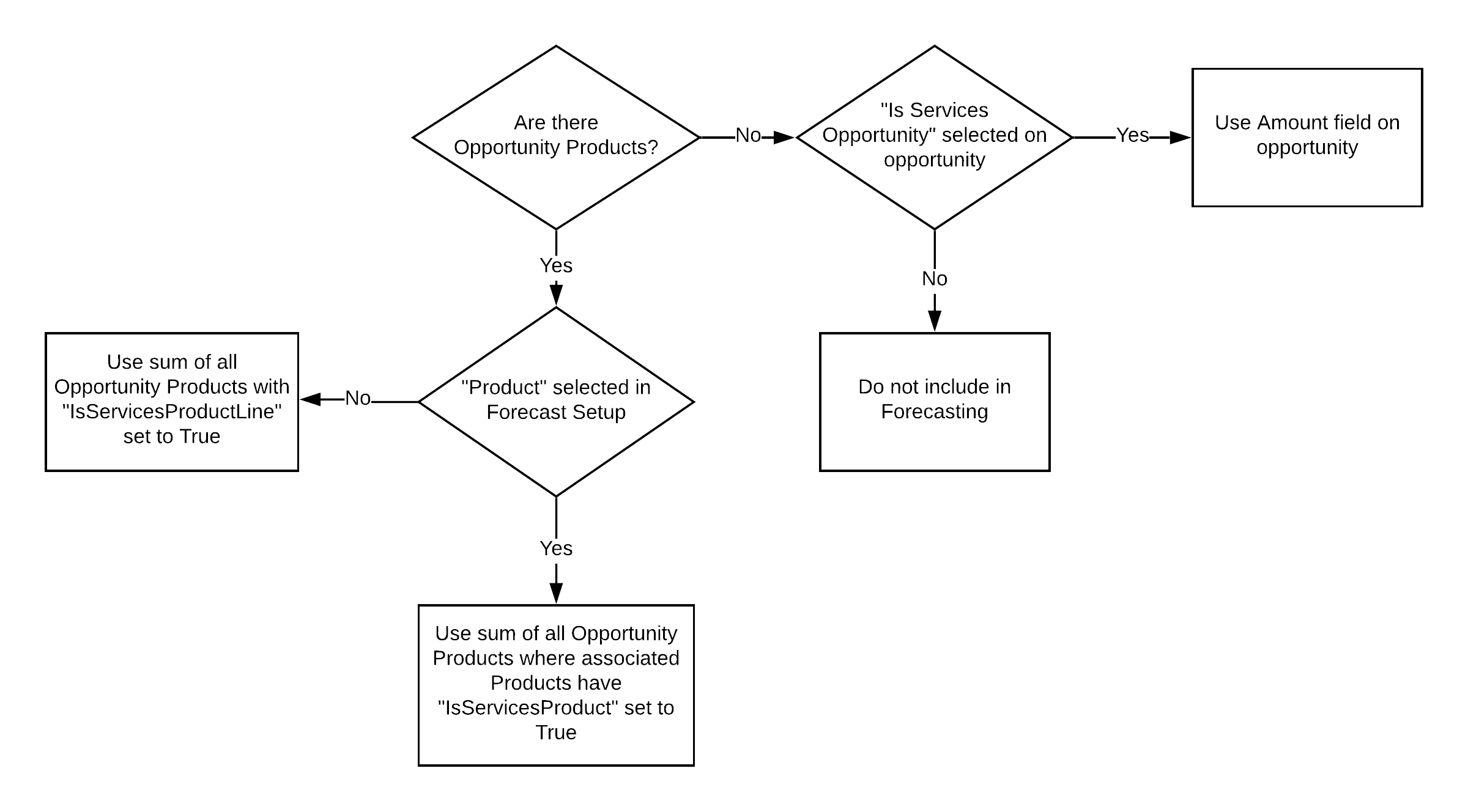
The opportunity value is determined by the following:
The opportunity value can be calculated in the following ways:
This flowchart shows how the opportunity value is calculated.
The calculated forecast value is the opportunity value multiplied by the opportunity probability, and then the forecast curve applied.
When applying the forecast curve:
If the opportunity value with the forecast curve applied is greater than zero, it is multiplied by the category Opportunity multipliers and stored in the appropriate category values.
Opportunity value = $62,500 with 100% probability, close date of May 31 , with a forecast period of June 1 to 30 with no lag and a max forecast period = 30, therefore in the forecast it should be 29/30
62,500 * 29/30 * weighting amount:
Expected (1.00) = $60,416.67
Best Case (1.20) = $72,500
Worst Case (0.75) = $45,312.50
Opportunity value = $62,500 with 50% probability, close date of May 25, with a forecast period of June 1 to 30 with no lag and a max forecast period = 30, therefore in the forecast it should be 24/30 (6 days being outside the forecast period)
31,250 * 24/30 * weighting amount:
Expected (1.00) = $25,000
The following fields are created on the Forecast Detail record, however, they are not used in a forecast or forecast calculation and are created by the Forecast process.
Timecards total billing amount. Where the end date is before the end date of the forecast period and the end date is before the end of last week. Must also be related to a project we are interested in, and have the Billable and Include in Financials flags set to True.
Milestones amount. For a milestone whose actual date is before the end date of the time period for the forecast. Must also be related to a project we are interested in, and have the Include in Financials flag set to True.
Miscellaneous adjustment amount. For a miscellaneous adjustment whose effective date is before the end date of the time period for the forecast. Must also be related to a project we are interested in, and have the Include in Financials flag set to True. Transaction Category must be equal to ‘Pass-Through Ready-to-Bill Revenue’ or ‘Ready-to-Bill Revenue’ (can override this value by setting the config ‘asm-billing’/’miscellaneousAdjustmentCategories’.)
Budgets prebilled amount. For a budget whose effective date is before the end date of the time period for the forecast. Must also be related to a project we are interested in, and have the Include in Financials flag set to True.
Expenses billable amount. For an expense whose expense date is before the end date of the time period for the forecast. Must also be related to a project we are interested in, and have the Include in Financials flag set to True.
Related Concepts
Enhanced Services Forecasting Overview
About Services Revenue Forecast Overrides
Related Tasks
Managing Curves for Forecast Calculations
Configuring Forecast Calculations
Overriding Services Revenue Forecast Values
Scheduling Forecast Calculations
Viewing a Services Revenue Forecast
Committing a Services Revenue Forecast
Performing Enhanced Services Forecasting Upgrade Tasks Summer 2018
Updating Enhanced Services Forecasting Data Spring 2019
Reference
Forecast Calculation Log Fields
Forecast Detail Category Fields
Forecast Setup Category Fields