To enter overrides on the Services Revenue Forecast, you must have been assigned one of the following permission sets:
- PSA - Services Forecasting
- PSA - Services Forecasting - Overrides
For more information on the permission sets available for Enhanced Services Forecasting, see Enhanced Services Forecasting Permission Sets.
To override a value:
- Click the value you want to override.
- Enter the override value.
- Type some notes to explain why you are entering the override.
- Click Save. The value displayed on the Services Revenue Forecast is adjusted and an icon is displayed next to the value to indicate whether the override value is higher, lower, or the same as the original value generated by the forecast calculation.
If you hover over an adjusted value or a summary roll-up on the Services Revenue Forecast, a tooltip is displayed. For more information on the Services Revenue Forecast, see Viewing a Services Revenue Forecast.
Calculating Multiple Currencies for Overrides
The values on the Services Revenue Forecast are displayed in the currency of the corresponding RPG. If multiple currencies are displayed on the Services Revenue Forecast, override calculations use the exchange rate that was current on the Created Date of the forecast calculation.
The following example shows how multiple currencies work with overrides and how the values are rolled up.
Example
Canada is set up as a subregion of North America.
The following currencies apply:
- North America: USD
- Canada: CAD
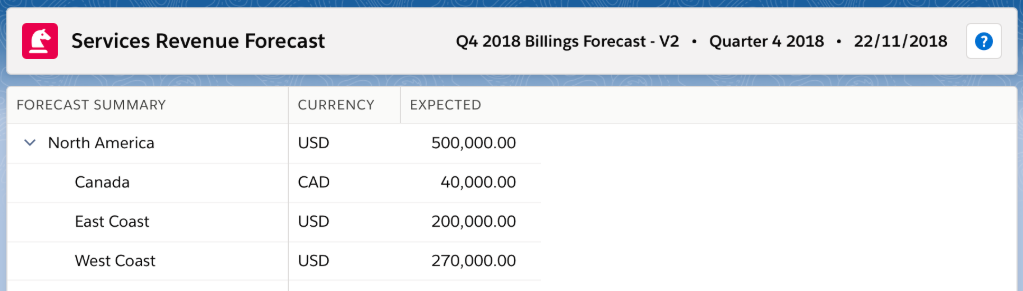
The Expected value returned by the forecast calculation for North America is 500,000 USD.
The Expected value returned by the forecast calculation for Canada is 40,000 CAD.
You override the value for Canada to 50,000 CAD because you know you are going to reach a milestone with a value of 10,000 CAD earlier than expected.
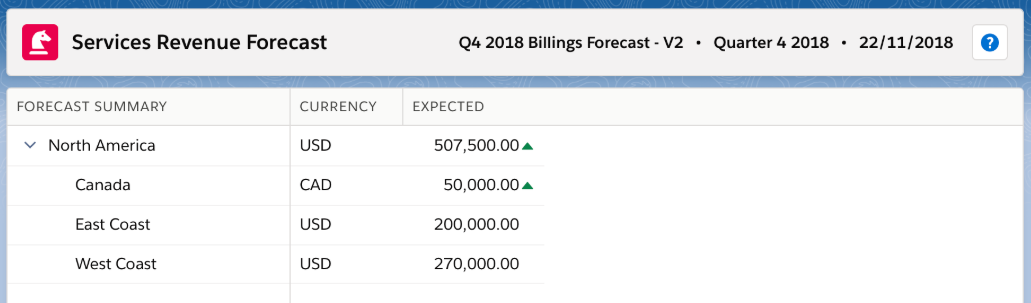
The adjusted value calculation for North America uses a CAD to USD exchange rate of 0.75. The calculation is Original Value + (Override Variance * Exchange Rate):
500,000 + (10,000 * 0.75) = 507,500 USD
The value for North America is changed to 507,500 USD following the override and the  icon indicates that the adjusted value is greater than the original value returned by the forecast calculation.