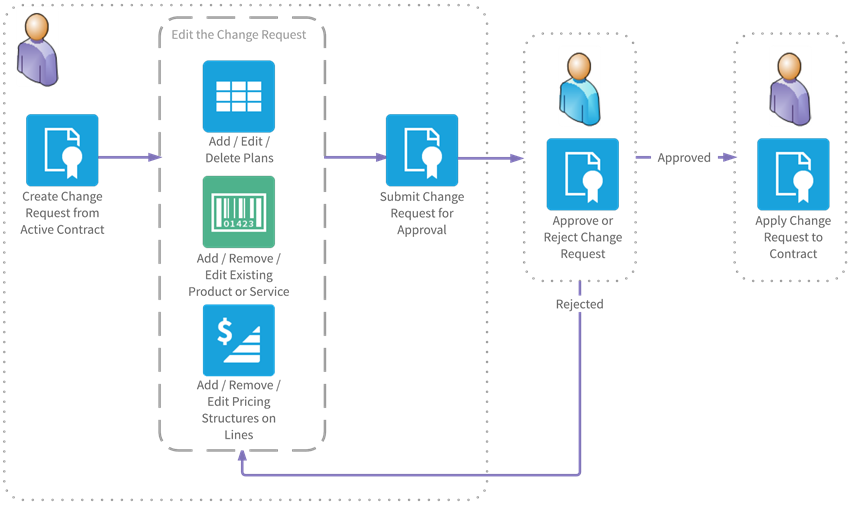
A change request is a copy of an active contract on which you can propose changes. You can submit a change request for approval using a Salesforce approval process and apply it to the active contract. You can create a change request for an active contract on the Contract Detail page. If a change request is in progress for a contract, a link to that change request is displayed on the Contract Detail page.
Once a contract is active, you may need to create a change request to edit the contract depending on the options your administrator has chosen. See FinancialForce Billing Central Settings and Contract.
When you create a change request, the values of custom fields on the contract are copied to the change request and the values of custom fields belonging to related contract line items are copied to the change request line items.
When you create a change request for a contract, pricing structures on active contract line items that have not yet been billed are copied and the copies are applied to the change request line items. This ensures that the pricing structures on the active contract are unaffected by changes that you make to pricing structures on change request line items.
When you apply a change request to a contract, the changes on that change request are applied to the active contract. The change request then becomes a superseded contract and contains the contract as it was before the change request was applied. In addition:
Complete billing documents and billing schedules that are associated with complete billing documents are not deleted.
The diagram that follows shows a sample workflow for creating a change request from an active contract and applying it.
Click the image to expand it.
 View Tutorial